Buying Your Own Modem Router Combo for Optimum Cable Internet
Optimum charges cable internet customers a monthly equipment rental fee, typically $10 to $15 per month depending on your plan. Over a year, that adds up to $120 to $180 going straight to Optimum for hardware you could own outright. A modem router combo pays for itself in about 6 to 10 months, and everything after that is money saved.
But here is the catch, and it is a big one. This only applies to Optimum cable internet customers. If you are on Optimum Fiber, stop here. Fiber service requires Optimum’s ONT (Optical Network Terminal), which connects directly to the fiber line coming into your home. You cannot replace it with your own equipment. The good news for fiber customers is that Optimum does not charge a rental fee for the ONT.
This guide covers Optimum’s cable plans, including the 300, 500, and 1 Gig tiers. If you are on one of those plans and tired of paying rent on a piece of equipment, keep reading. We will break down exactly which modem router combos work, what specs matter, and which models give you the best value at each speed tier.
For Fios, see our best combos for Verizon Fios.
Does Optimum Let You Use Your Own Modem
Yes, but only on cable internet. Optimum cable customers can swap out the rented gateway for their own DOCSIS modem or modem router combo. This has been the case for years, and it is a straightforward process once you know the steps.
Optimum Fiber is a different story entirely. The fiber service uses a dedicated ONT that Optimum installs and manages. You cannot replace the ONT with third-party equipment. However, you can connect your own WiFi router to the ONT’s Ethernet port if you want better WiFi coverage or features. You just cannot ditch the ONT itself.
To get your own modem working on Optimum cable, you need to register it with Optimum. Call their customer service line or visit an Optimum store with your new modem’s MAC address (printed on the bottom label of the device). They will add it to your account on their end. Without this step, your modem will not get an IP address and you will have no internet connection, even if the modem is perfectly compatible.
One thing that surprises many customers: Optimum does not publish an official approved modem list like Xfinity and Spectrum do. There is no page on their website where you can check compatibility. In practice, any standard DOCSIS 3.0 or DOCSIS 3.1 modem works with their cable network. DOCSIS 3.1 is the better choice for plans above 300 Mbps, and we recommend it even for the 300 plan if you want to future-proof your purchase.
What DOCSIS Version Do You Need for Optimum
DOCSIS stands for Data Over Cable Service Interface Specification. It is the standard that cable modems use to communicate with your ISP’s network. Think of it like a language version where newer versions can carry more data, faster.
DOCSIS 3.0 has been the standard for over a decade. It supports download speeds up to about 1 Gbps in theory when using 32 downstream channels, but in real-world conditions, it handles plans up to 300 to 400 Mbps comfortably. Beyond that, it starts to struggle.
DOCSIS 3.1 is the current standard and a significant upgrade. It supports downstream speeds up to 10 Gbps using OFDM (Orthogonal Frequency Division Multiplexing) technology instead of the older channel-bonding approach. If you are on Optimum’s 500 Mbps or 1 Gig cable plan, DOCSIS 3.1 is not optional. You need it.
DOCSIS 3.1 modems are backward compatible with DOCSIS 3.0 networks, so they work on any cable plan. Even if you are on the 300 Mbps plan today, buying a DOCSIS 3.1 modem means you will not need to replace it when you upgrade to a faster plan later. The price difference between DOCSIS 3.0 and 3.1 modems has shrunk enough that DOCSIS 3.1 is the smarter buy in almost every case.
| Specification | DOCSIS 3.0 | DOCSIS 3.1 |
|---|---|---|
| Max Download Speed | ~1 Gbps (theoretical) | Up to 10 Gbps |
| Max Upload Speed | ~200 Mbps | Up to 1-2 Gbps |
| Channel Technology | SC-QAM (channel bonding) | OFDM + SC-QAM |
| Typical Channel Bonding | 16×4 or 32×8 | 2 OFDM + 32 SC-QAM |
| Optimum 300 Plan | Works (16×4 or higher) | Works (recommended) |
| Optimum 500 Plan | Not sufficient | Required |
| Optimum 1 Gig Plan | Not sufficient | Required |
| Backward Compatible | N/A | Yes (works on 3.0 networks) |
Best Modem Router Combo for Optimum 300 Plan
The 300 Mbps plan is Optimum’s entry-level cable tier, and it does not demand much from your hardware. A DOCSIS 3.0 modem with 16×4 or 32×8 channel bonding will handle it. That said, DOCSIS 3.1 is the better investment since it gives you room to grow without buying new equipment if you bump up to a faster plan down the road.
For WiFi, the 300 plan pairs well with WiFi 5 (802.11ac) or WiFi 6 (802.11ax). WiFi 5 can deliver 300 Mbps wirelessly in good conditions, so you are not leaving speed on the table. WiFi 6 gives you better performance with multiple devices connected at the same time, but it is not strictly necessary at this speed tier.
Motorola MG8702
The Motorola MG8702 combines a DOCSIS 3.1 modem with a WiFi 5 (AC3200) router in one device. It has four Gigabit Ethernet ports on the back for wired connections. The AC3200 WiFi rating means it uses a tri-band setup with combined theoretical throughput of 3,200 Mbps across its bands, far more than the 300 plan requires.
This modem handles the 300 plan without breaking a sweat, and it will also work if you upgrade to the 500 Mbps or even 1 Gig plan later. The WiFi 5 radio covers small to medium-sized homes (up to about 2,000 square feet) effectively. For a single-device purchase that just works, the MG8702 is hard to beat at this tier.
ARRIS SURFboard SBG8300
The ARRIS SURFboard SBG8300 is a more budget-friendly DOCSIS 3.1 option. It features WiFi 5 (AC2350) and four Gigabit Ethernet ports. The AC2350 rating is lower than the MG8702, but at 300 Mbps, the difference is negligible in everyday use.
ARRIS has been making cable modems longer than almost anyone, and the SBG8300 reflects that experience. It is reliable, straightforward to set up, and priced lower than most DOCSIS 3.1 combos. If you are on the 300 plan and want to save as much as possible while still getting DOCSIS 3.1, this is the one to consider.
Best Modem Router Combo for Optimum 500 Plan
At 500 Mbps, you are firmly in DOCSIS 3.1 territory. Do not try to save $20 by buying a DOCSIS 3.0 modem for this plan. A DOCSIS 3.0 modem might technically connect, but you will not get your full 500 Mbps speeds. You are paying for 500 Mbps, so make sure your hardware can deliver it.
WiFi 6 (802.11ax) becomes more valuable at this speed tier. WiFi 5 can still handle 500 Mbps on its 5 GHz band in ideal conditions, but WiFi 6 does it more consistently, especially when you have 10 or more devices connected. If your household has phones, tablets, laptops, smart TVs, and smart home devices all connected at once, WiFi 6 makes a noticeable difference.
Motorola MG8725
The Motorola MG8725 is the WiFi 6 upgrade to the MG8702. It pairs a DOCSIS 3.1 modem with a WiFi 6 (AX6000) router. The hardware includes four Gigabit Ethernet ports and one 2.5 Gbps Ethernet port. That faster port matters for wired devices that can take advantage of speeds beyond 1 Gbps.
WiFi 6 at AX6000 gives this combo serious wireless throughput. It handles the 500 plan comfortably and supports enough simultaneous device connections for a busy household. The 2.5 Gbps Ethernet port also future-proofs you if you ever move to the 1 Gig plan, since a standard 1 Gbps Ethernet port would bottleneck a gigabit connection.
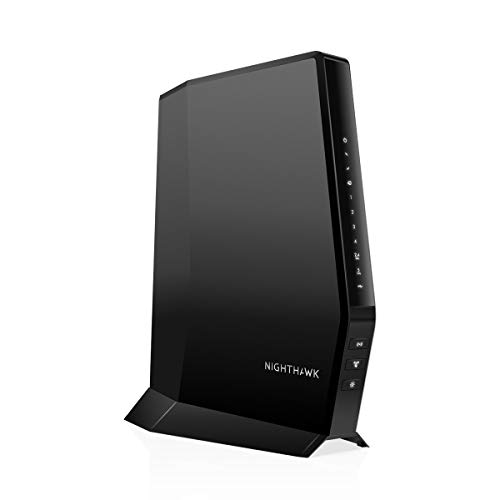
Netgear CAX30 (Nighthawk AX2700)
The Netgear CAX30, marketed as the Nighthawk AX2700, is a more compact DOCSIS 3.1 and WiFi 6 combo. It offers AX2700 WiFi speeds and four Gigabit Ethernet ports. The AX2700 rating is lower than the MG8725’s AX6000, but it is still WiFi 6 and handles 500 Mbps plans well.
Where the CAX30 stands out is its design and software. It is smaller than most modem router combos, which matters if your modem sits on a desk or shelf. Netgear’s companion app makes setup and management simple. You can check connected devices, run speed tests, and adjust settings from your phone. For customers who want a clean setup and easy management, the CAX30 is a strong pick for the 500 plan.
| Model | DOCSIS | WiFi Standard | WiFi Speed Rating | Gigabit Ethernet Ports | 2.5 Gbps Port | Best For |
|---|---|---|---|---|---|---|
| Motorola MG8702 | 3.1 | WiFi 5 (AC) | AC3200 | 4 | No | 300 Mbps plan |
| ARRIS SBG8300 | 3.1 | WiFi 5 (AC) | AC2350 | 4 | No | 300 Mbps (budget) |
| Motorola MG8725 | 3.1 | WiFi 6 (AX) | AX6000 | 4 | Yes (1) | 500 Mbps / 1 Gig |
| Netgear CAX30 | 3.1 | WiFi 6 (AX) | AX2700 | 4 | No | 500 Mbps plan |
| Netgear CAX80 | 3.1 | WiFi 6 (AX) | AX6000 | 4 | Yes (1) | 1 Gig plan |
Best Modem Router Combo for Optimum 1 Gig Plan
The 1 Gig cable plan is Optimum’s fastest cable tier, and your hardware choices here matter more than at any other speed. You absolutely need DOCSIS 3.1. But there is another bottleneck most people overlook: Ethernet port speed.
Standard Gigabit Ethernet tops out at 1,000 Mbps. If your modem router combo only has Gigabit Ethernet ports, your wired connection physically cannot exceed 1 Gbps, and real-world throughput will be more like 940 Mbps due to overhead. A 2.5 Gbps Ethernet port removes that bottleneck and lets you take full advantage of a gigabit plan on wired devices.
Motorola MG8725
The MG8725 appears again here because it genuinely handles the 1 Gig plan well. The DOCSIS 3.1 modem can handle the full gigabit download speed, and the 2.5 Gbps Ethernet port means your wired connection is not capped at 1 Gbps. WiFi 6 at AX6000 provides strong wireless coverage for medium to large homes.
If you are looking for one device that covers the 1 Gig plan without spending on a premium flagship, the MG8725 is the sweet spot. It gives you the 2.5 Gbps port, WiFi 6, and DOCSIS 3.1 at a reasonable price point.
Netgear CAX80 (Nighthawk AX6000)
The Netgear CAX80 is the premium option. It matches the MG8725’s DOCSIS 3.1 modem and AX6000 WiFi 6 rating, and it also has a 2.5 Gbps Ethernet port alongside four standard Gigabit Ethernet ports. Where the CAX80 pulls ahead is in WiFi performance for larger homes.
The CAX80 uses a higher-end antenna design and more powerful radios, which translates to better range and stronger signal in rooms far from the modem. If your home is over 2,500 square feet or has thick walls that degrade WiFi signals, the CAX80’s extra wireless power is worth the price bump over the MG8725.
One important reality check for any 1 Gig plan customer: do not expect to see 1,000 Mbps over WiFi. Even with WiFi 6, real-world wireless speeds on a gigabit plan typically land between 400 and 600 Mbps under good conditions. Walls, distance, interference from neighboring networks, and the WiFi capabilities of your individual devices all play a role. To hit actual gigabit speeds, you need a wired Ethernet connection, preferably through that 2.5 Gbps port on either the MG8725 or CAX80.
Should You Buy a Modem Router Combo or Separate Modem and Router for Optimum
This is a real decision, not a throwaway question. Both setups have trade-offs, and the right choice depends on your plan speed, home size, and how much you care about WiFi performance.
A modem router combo gives you simplicity. One device, one power cord, one setup process. You plug in the coaxial cable from the wall, connect to power, call Optimum to register the MAC address, and you are online. Combos also tend to cost less than buying a separate modem and router. Less desk clutter, fewer points of failure during initial setup.
The downside of combos is flexibility. If the WiFi radio dies, you replace the entire unit even though the modem half still works. WiFi performance in combos is generally a step below what a standalone router can deliver because the antennas are smaller and heat from the modem side can affect performance. You also cannot upgrade your WiFi independently. If WiFi 7 routers become the standard next year, you would need to replace the whole combo to get it.
A separate modem and router setup gives you stronger WiFi, more upgrade flexibility, and the option to use mesh WiFi systems. Dedicated routers have larger antennas, better processors, and more advanced features like QoS (Quality of Service) and parental controls. You can swap the router for a mesh system if your coverage needs change, without touching the modem.
The trade-off is cost and complexity. Two devices cost more upfront. You have more cables to manage and two admin interfaces to configure. If something goes wrong, you need to figure out whether the problem is the modem or the router.
| Factor | Modem Router Combo | Separate Modem + Router |
|---|---|---|
| Upfront Cost | Lower (one device) | Higher (two devices) |
| Setup Simplicity | Easier (single device) | More steps (two configs) |
| WiFi Performance | Good for small-medium homes | Better range and throughput |
| Upgrade Flexibility | Replace entire unit | Upgrade router independently |
| Mesh WiFi Compatible | No | Yes |
| Physical Footprint | One device, less clutter | Two devices, more cables |
| Troubleshooting | Simpler (one device) | Need to isolate which device |
For most Optimum cable customers on the 300 or 500 Mbps plan living in a small to medium-sized home, a combo unit is the practical choice. It saves money and keeps things simple.
For 1 Gig plan customers or anyone in a large home with WiFi dead zones, consider going the separate route. A standalone DOCSIS 3.1 modem like the Motorola MB8611 or ARRIS SURFboard S33 paired with a WiFi 6 router or mesh system will outperform any combo unit in both speed and coverage. The MB8611 and S33 both have 2.5 Gbps Ethernet ports, so you get the full benefit of your gigabit plan on the modem side while choosing whatever router best fits your home layout.
Frequently Asked Questions
Can I use my own modem with Optimum Fiber?
No. Optimum Fiber requires their ONT (Optical Network Terminal) to connect to the fiber line. You cannot replace the ONT with third-party equipment. However, Optimum does not charge a rental fee for the ONT, so there is no cost savings from replacing it anyway. You can use your own WiFi router connected to the ONT’s Ethernet port if you want better wireless performance than Optimum’s included gateway provides.
How do I activate my own modem on Optimum?
You need to contact Optimum to register your modem’s MAC address on their network. You can call their customer service line or visit an Optimum store in person. Have your modem’s MAC address ready, as it is printed on a label on the bottom or back of the device. The representative will add the MAC address to your account, and your modem should connect within 15 to 30 minutes. If it does not connect after an hour, power cycle the modem by unplugging it for 30 seconds and plugging it back in.
Does Optimum have an approved modem list?
No. Unlike Xfinity and Spectrum, Optimum does not publish an official list of approved or compatible modems on their website. In practice, any standard DOCSIS 3.0 or DOCSIS 3.1 cable modem works on their network. The modem router combos recommended in this guide have all been used successfully by Optimum cable customers. When in doubt, look for modems that are certified for use with Xfinity or Spectrum because those same modems work with Optimum’s cable network since they all use the same DOCSIS standard.
Will I lose my Optimum email if I use my own modem?
No. Your Optimum email account is tied to your Optimum internet subscription, not to the specific modem you use. Switching to your own modem does not affect your email, your account login, or any other Optimum account features. Your email will continue to work the same way through webmail or any email client you currently use.
Do I need DOCSIS 3.1 for Optimum?
It depends on your plan. For the 300 Mbps plan, DOCSIS 3.0 with at least 16×4 channel bonding will work, but DOCSIS 3.1 is recommended since the price difference is small and it future-proofs your purchase. For the 500 Mbps and 1 Gig plans, DOCSIS 3.1 is required. A DOCSIS 3.0 modem will not deliver the full speeds you are paying for on those higher-tier plans.
Can I use a mesh WiFi system with Optimum?
Spectrum user? Check our best combos for Spectrum.
Your router is only as fast as your internet plan. See which providers and speed tiers are available in your area.
Yes, but not with a modem router combo. Mesh systems like the Netgear Orbi, TP-Link Deco, or Amazon Eero need to be connected to a standalone modem, not a combo unit. You would buy a DOCSIS 3.1 modem (such as the Motorola MB8611 or ARRIS S33), connect the mesh system’s base unit to the modem via Ethernet, and then place the satellite units around your home. This setup gives you the best WiFi coverage in large homes or homes with multiple floors. The modem handles the internet connection while the mesh system handles WiFi distribution.