Why the Canon T7i Works for Weddings
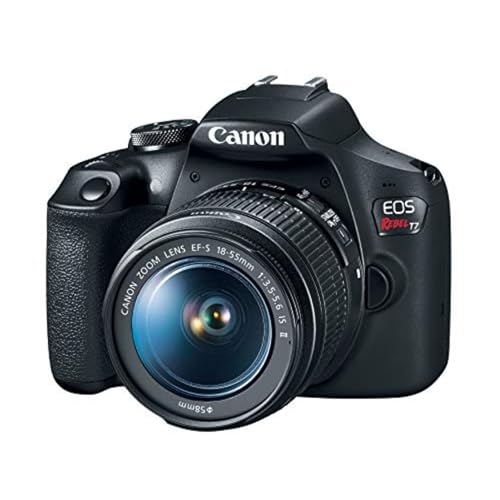
The Canon T7i (also sold as the EOS 800D) packs a lot of capability into an affordable body. It has a 24.2-megapixel APS-C sensor, 45-point all cross-type autofocus, Dual Pixel CMOS AF for live view and video, 6 fps continuous shooting, and 1080p video at up to 60 fps. For a photographer shooting their first weddings or covering smaller ceremonies, this camera can deliver professional-quality results when paired with the right settings and lenses.
Wedding photography is one of the most demanding types of shooting. You move between bright outdoor light and dim indoor reception halls, switch from posed portraits to fast candid moments, and you get one chance to capture each event. Here’s how to set up the T7i to handle it. For a broader look at the craft, check out our full guide to wedding photography.
Lens Recommendations
The Must-Have: 50mm f/1.8 STM
The Canon EF 50mm f/1.8 STM (the “nifty fifty”) is the single best lens investment for wedding shooting on a T7i. On the APS-C sensor, it gives you an 80mm-equivalent field of view, which is ideal for portraits, detail shots, and candid moments. The f/1.8 aperture lets in a ton of light and produces beautiful background blur. It’s also lightweight, quiet, and very affordable. You can read more about its bigger sibling in our Canon EF 50mm review.
Zoom Options
A standard zoom like the 17-55mm f/2.8 or the 24-70mm f/2.8L gives you flexibility during the ceremony when you can’t move freely. A telephoto zoom like the 70-200mm f/2.8L is excellent for shooting from the back of the church or capturing reactions from across the room. If those L-series lenses are out of budget, the Canon EF-S 18-135mm IS STM covers a wide range and handles well in daylight and moderately lit venues.
Ceremony Settings
Shooting Mode
Set the T7i to Av (Aperture Priority) mode. This lets you control depth of field while the camera handles shutter speed. For most ceremony shots, open the aperture to f/2.8 or wider. This keeps your shutter speed high enough for sharp handheld shooting in dim church lighting and gives you that creamy background separation that makes wedding photos stand out.
ISO
Start at ISO 800 and adjust based on available light. In darker churches and chapels, you may need to push to ISO 1600 or 3200. The T7i handles noise reasonably well up to ISO 3200. Beyond that, you’ll notice some grain, but a slightly noisy photo is always better than a blurry one. Set Auto ISO with a maximum of 6400 as a safety net.
Autofocus
Use AI Servo (continuous) AF for the processional and recessional when subjects are walking toward or away from you. Switch to One-Shot AF for posed moments and still compositions. The T7i’s 45-point AF system covers a wide area of the frame, but for the most accurate focus in tricky light, select a single AF point and place it directly on the subject’s nearest eye.
Drive Mode
Set continuous shooting (6 fps). During the vows, the ring exchange, and the first kiss, fire short bursts of 3 to 5 frames to make sure you nail the exact right expression and moment.
Metering
Evaluative metering works well for most ceremony situations. If the bride is in a white dress against a dark background (or the groom is in a dark suit against a bright window), the meter can be fooled. Use exposure compensation (+0.7 to +1.0 for white dresses against dark backgrounds) to adjust on the fly.
Reception Settings
Flash
Receptions are usually darker than ceremonies, and many venues allow flash. Mount an external Speedlite on the T7i’s hot shoe. Bounce the flash off the ceiling or a nearby white wall for soft, natural-looking light. Direct flash creates harsh shadows and unflattering highlights. If you can’t bounce, use a small flash diffuser to soften the output.
Settings for the Dance Floor
Switch to Manual mode. Set your shutter speed to 1/125, aperture to f/2.8, and ISO to 1600. Fire the Speedlite in TTL mode and let the camera balance ambient light with flash. This combination freezes motion on the dance floor while keeping the warm ambient lighting of the venue visible in the background. Dragging the shutter a bit (1/60 to 1/80) adds some motion blur for a more energetic feel, but keep a steady hand.
White Balance
Churches often have mixed lighting: warm tungsten bulbs, cool daylight from stained glass windows, and overhead fluorescents. Set white balance to Auto (AWB). The T7i’s AWB handles mixed light reasonably well, and since you’re shooting RAW, you can fine-tune white balance in post with no quality loss.
File Format
Always shoot RAW+JPEG. RAW files give you full control over exposure, white balance, and color in editing. The JPEG provides a quick preview and a backup in a universally compatible format. Wedding light changes fast, and RAW lets you recover highlights and shadows that would be lost in a JPEG-only workflow.
Backup and Gear Prep
Bring at least two fully charged batteries (LP-E17). A wedding day runs 6 to 10 hours, and you’ll burn through more battery than you expect, especially if you’re reviewing shots on the LCD. Pack two or three 32 GB or 64 GB SD cards. After filling a card, swap it out and store the full card in a separate case. Never delete photos on the card during the event.
The night before the wedding, format all cards in-camera, charge all batteries, clean your lenses, and test your flash. Arriving with dead batteries or a corrupted card is a mistake you can’t recover from on the day.
Key Moments to Capture
Getting ready: Dress details, shoes, rings, candid moments with family and bridesmaids or groomsmen. Shoot at f/2.8 or wider with window light for a natural, editorial feel.
First look: Continuous AF, burst mode. Capture the approach, the turn, the reaction, and the embrace.
Ceremony: Wide establishing shot, close-ups of hands and rings, the expressions of the couple and guests, the first kiss.
Portraits: After the ceremony, use golden-hour light if timing allows. Av mode, f/2.8, lowest ISO possible.
Reception: Toasts, first dance, cake cutting, bouquet toss, candid guest reactions.
Making the T7i Shine
The T7i isn’t a full-frame pro body, but it doesn’t need to be. With a fast prime, good flash technique, and the right settings, it produces images that clients will love. Shoot RAW, keep your AF sharp, manage your exposure in tricky light, and come prepared with backups. That combination covers more ground than expensive gear alone.