How to Work with Nikon D7200 Wedding Settings
The Nikon D7200 is one of the best feature-packed cameras from Nikon, and it’s a popular pick among professional landscape and wedding photographers alike. Getting the right Nikon D7200 wedding settings dialed in before the big day can make the difference between ordinary snapshots and stunning ceremony photos that people treasure forever.
The D7200 packs a 24.2MP CMOS sensor and runs on an EXPEED 4-series image processor. Unlike many competing cameras, the D7200 can capture up to 100 JPEGs in a burst or 27 RAW files. It also includes a feature called Picture Control 2.0, which lets you customize different picture profiles. This includes a flat mode that produces images with low contrast and maximum dynamic range, giving you more flexibility in post-processing.
Shooting Wedding Photography with Nikon D7200
Nikon D7200 wedding settings – photoStep 1: Shoot in RAW Format
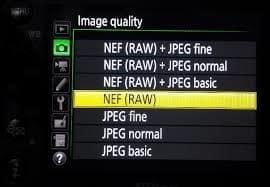
When shooting a wedding ceremony, using RAW image format is the way to go. RAW files contain all the image data recorded by the camera’s sensor, giving you high-quality files with maximum editing flexibility. JPEG format, on the other hand, compresses the data and discards information you can never recover.
The big advantage of RAW is that you can fix problems in post-processing without suffering a major drop in quality. White balance off? Fix it in Lightroom or Photoshop. Exposure slightly wrong? Adjust it without degradation. With JPEG, those same corrections would noticeably reduce image quality and introduce artifacts.
You’ll need software like Adobe Photoshop or Lightroom to view and edit RAW files, as they can’t be opened by basic image viewers. The Nikon D7200 can capture up to 27 RAW files in a single burst, which is plenty for most wedding moments.
Step 2: Use Continuous Shooting Mode
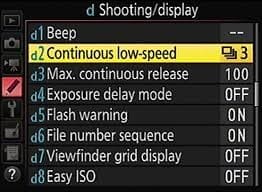
For wedding photography, continuous shooting mode is incredibly useful because it lets you fire off a rapid sequence of images. Switch your camera mode to continuous and hold down the shutter button to capture several frames in quick succession.
Here’s a tip from experienced wedding photographers: keep shooting for a moment or two after the subject finishes posing. This lets them relax slightly, and you’ll often catch more natural, candid expressions in those extra frames. The best wedding photos are often the ones taken in between posed moments.
A few things to keep in mind with continuous shooting: the camera stores images in its buffer first and writes them to the memory card after you stop shooting. The more shots you take in a burst, the longer you’ll wait before you can start shooting again. The processing needs time to catch up.
Also, shooting at high frame rates drains your battery faster and fills up your memory card more quickly. So while continuous mode is great for key moments (the first kiss, walking down the aisle, the ring exchange), shooting all day in burst mode isn’t practical. Be selective about when you use it, and bring backup batteries and memory cards to avoid running out at a bad time.
Step 3: Choose the Right Memory Cards
Memory cards are one of the most important pieces of gear for wedding photography. When you’re using burst mode to capture fast sequences of images, you need a memory card that can write data quickly, even with the D7200’s fast image processor.
A memory card with at least 170 MB/s write speed is highly recommended for Nikon D7200 wedding photography. Fast cards prevent the buffer from filling up too quickly and let you get back to shooting sooner after a burst.
If you’re shooting in RAW format (and you should be for weddings), you’ll also want a high-capacity card. RAW files are much larger than JPEGs because they contain unprocessed sensor data. A 64GB or 128GB card is a good starting point. And always bring a backup card. Running out of storage at a wedding is not a situation you want to find yourself in.
Step 4: Pack the Right Gear in Your Camera Kit
Beyond the camera and memory cards, your kit needs a few more things for successful wedding photography.
A tripod is a must for preventing shaky shots, especially during the ceremony when you might be using slower shutter speeds in a dimly lit venue. Even a small, portable tripod can make a significant difference in image sharpness.
Bring at least one additional lens for more flexibility. A wide-angle lens is great for venue shots and large group photographs, while a telephoto lens (either zoom or prime) lets you capture intimate moments from a distance without being intrusive. Having both options gives you the versatility to handle any situation that comes up during the day.
An external flash is another important piece of gear. The D7200’s pop-up flash works in a pinch, but it tends to produce harsh, unflattering lighting. An external speedlight gives you more power, better angle control, and the option to bounce the light off ceilings or walls for softer, more natural-looking illumination.
And don’t forget extra batteries. Wedding days are long, and there’s nothing worse than a dead camera during the reception toasts or the first dance.
The Nikon D7200 is a very capable camera for wedding photography. By following these steps and practicing before the actual event, everything will feel second nature when the big day arrives. You’ll be ready to capture beautiful moments that last a lifetime.