Blink Mini vs Wyze Cam V3: Side-by-Side Comparison
With roughly one million home break-ins happening across the US every year, a home security camera is a smart investment and a solid way to deter burglars.
The good news? Getting a security system doesn’t have to cost a fortune. A lot of people still assume security equipment means big price tags and long contracts, but that’s just not true anymore.
The Blink Mini and Wyze Cam V3 are proof. Both come in under $40, and they’re basically ready to go right out of the box. That’s real home protection on a budget, whether you’re monitoring from home or on the go.
So which one should you get? Let’s break down the strengths and weaknesses of each.
Battery
Blink cameras work with Double-A 1.5V lithium non-rechargeable batteries. Battery life can stretch up to two years depending on how much you use the camera.
Blink does point out that slow internet speeds and weak signals between cameras can eat into battery life faster. If you need a replacement, the Energizer Ultimate Lithium AA battery is the one Blink recommends. Stay away from Li-Ion (Lithium-Ion) batteries since they don’t work with Blink cameras.
The Wyze V3 Cam has a built-in battery. Wyze says it should last between three and six months on a charge.
On a similar note, our outdoor wireless security camera system with dvr article has more practical tips.
Once it dies, just plug it into a power cable and connect it to the base station to charge up.
If you’d rather skip the cables entirely, Blink has the edge here. Pop in the batteries and you’re good for up to two years.
Camera
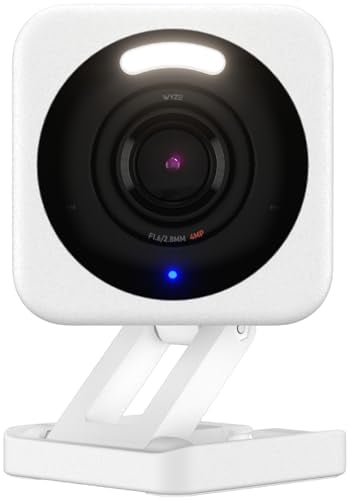
Both cameras record in Full HD (1080p). The Blink Mini has a 110° field of view, while the Wyze Cam goes a bit wider at 130°.
They both handle low-light conditions decently, but the Wyze Cam pulls ahead thanks to color night vision. That extra color gives you better context for what’s happening in the footage.
Monthly Cost
Blink lets you store footage locally or in the cloud. Cloud storage runs between $3 and $10 per month, depending on the plan.
Wyze keeps things affordable too. The Cam Plus Plan supports continuous recording and costs just $1.99 per month per camera.
Professional Monitoring
Neither Blink nor Wyze includes professional monitoring in their standard plans.
That said, Wyze does offer ‘Wyze Home Monitoring’ as a separate service. If you want coverage across your whole house, it’s worth looking into.
Storage
The Blink Mini uploads motion-triggered clips to Blink’s cloud. You can review them anytime through the Blink app.
We walk through how to reset Blink camera step by step in a separate post.
Clips stay available for 60 days, and during that window you can download or share them. After 60 days, they’re gone for good.
If you want to keep certain clips longer, you can expand storage with the Blink storage module USB flash drive. One downside: the Blink Mini doesn’t support continuous recording.
The Wyze Cam does support continuous recording. You can pop in a Wyze micro SD card and record nonstop.
Cloud storage is also available if you sign up for one of Wyze’s plans. For unlimited video recording, the Cam Plus Plan is what you want.
Trial Period
Blink gives new customers a 30-day trial with full access to the Blink Plus plan features. After the trial, you can keep using it for $2.99 per month or upgrade to the Plus Plan.
Wyze offers a shorter 14-day trial with full Cam Plus features. Just be aware that the subscription auto-renews after the trial since you need to attach a credit card during sign-up.
Final Thought
All things considered, the Wyze Cam is the better pick and worth the extra dollar over the Blink Mini.
The Blink Mini isn’t a bad camera by any means. The Wyze Cam simply delivers more value for the money, and color night vision alone makes it the stronger overall choice.
For a full comparison of the two biggest smart home ecosystems, check our Google Home vs Alexa guide.
For Google Home camera options, see our Google Home compatible cameras list.
Setting up Arlo? Our Arlo Essential Camera setup guide has every step.