Nikon D7200 Landscape Settings
Getting your Nikon D7200 landscape settings right can turn an ordinary outdoor shot into something special. The D7200 is an APS-C DSLR with a 24.2 MP CMOS sensor that lacks an optical low-pass filter (OLPF), which means it captures finer detail than most cameras in its class. Paired with the EXPEED 4 processor, it handles image data quickly and can fire off 100 JPEGs in a burst or 27 RAW files without breaking a sweat.
The native ISO range is 100-25,600, and you can push it further using the Hi BW1 and Hi BW2 expansion settings, reaching an equivalent of ISO 102,400. Keep in mind, though, that those expansion modes are JPEG-only and produce monochrome images.
The D7200 features Picture Control 2.0, letting you customize image profiles including a flat mode that delivers low contrast with maximum dynamic range. That flat mode is especially useful for landscapes because it preserves highlight and shadow detail for post-processing.
For video, you get full HD 1080p at 30/25p, plus 60p/50p when using the 1.3x crop mode. Built-in Wi-Fi and NFC make transferring images to your phone or tablet straightforward.
Shooting Landscapes with Nikon D7200
Step 1. Shoot in RAW Format
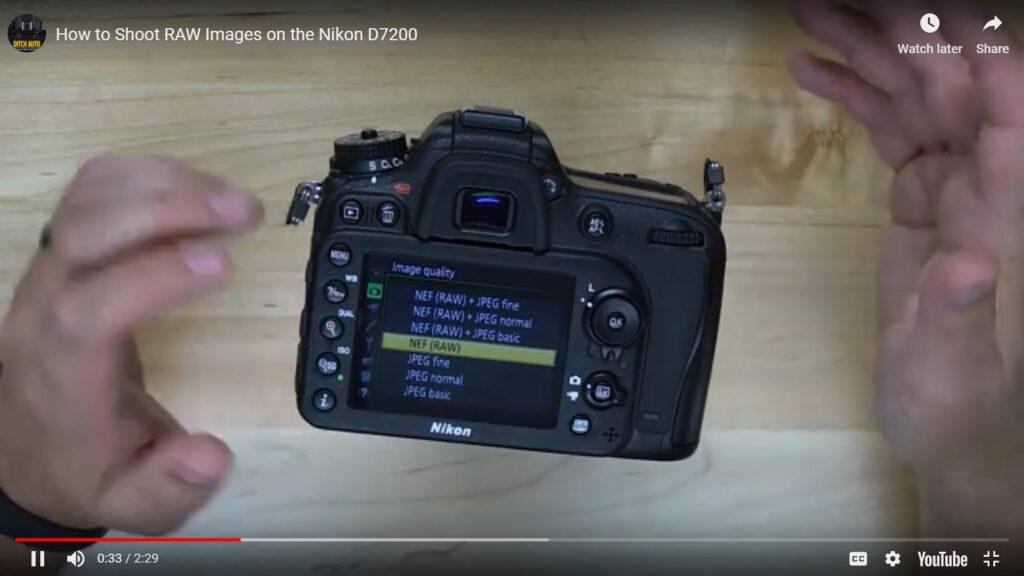
Switching to RAW format is simple on the D7200, and it makes a huge difference for landscape work. RAW files contain uncompressed image data (unlike JPEG, which throws away data to reduce file size), giving you much more flexibility when editing white balance, exposure, and color in post-production software like Adobe Lightroom or Photoshop.
The tradeoff is file size. RAW files from the D7200’s 24.2 MP sensor are noticeably larger than JPEGs, so bring extra memory cards. A 32GB or 64GB card gives you plenty of room for a full day of shooting.
Step 2. Add Filters for Better Shots
Lens filters are affordable accessories that can make a big difference in landscape photography, and their effects can’t always be replicated in software.
A graduated neutral-density (ND) filter is particularly useful. Half of the filter is darkened (neutral density), while the other half is clear. You position the dark half over the bright sky to bring it into the same exposure range as the ground. The result is a balanced image where both the sky and the foreground retain their detail.
A polarizing filter is another must-have for landscape shooters. It reduces reflections from water and glass, suppresses glare, and darkens skies for more dramatic contrast. Rotating the filter while looking through the viewfinder lets you dial in exactly how much polarization you want.
Don’t skimp on filter quality. Cheap glass can soften your images and introduce color shifts. Since the D7200’s sensor captures extra detail thanks to its missing OLPF, you want filters that preserve that sharpness rather than working against it.
Step 3. Invest in a Tripod and a Good Lens
A tripod eliminates camera shake, which matters even at faster shutter speeds. For landscape work involving slow shutter speeds (smooth waterfalls, rivers, or motion blur effects), a tripod is non-negotiable. Trying to handhold the camera at 1/4 second or slower will almost always result in blurry shots.
For lenses, you have several good options for the D7200:
- Nikon AF-S FX NIKKOR 200-500mm f/5.6E ED VR – great for compressing distant landscapes
- Nikon D7200 24.2 MP Dual Zoom Lens Kit – a versatile starting point
- Nikon AF-S NIKKOR 85mm f/1.8G – useful for isolating specific landscape details
When shooting landscape photos featuring smooth waterfalls or flowing water, you’ll need slow shutter speeds. Without a tripod, the camera shake from your hands will ruin the shot. Place the camera on a sturdy tripod and use a remote trigger or the self-timer to avoid any vibration from pressing the shutter button.
Step 4. Shoot from Different Perspectives
A change in position, tilt, or angle can completely transform a landscape image. Try getting low to the ground, climbing to a higher vantage point, or simply shifting a few feet to one side.
Wide-angle lenses are the go-to choice for most landscape photographers. They give you greater depth of field control and allow faster shutter speeds in brighter conditions. On the D7200’s APS-C sensor, a lens in the 10-20mm range gives you a field of view similar to 15-30mm on a full-frame camera, which is wide enough for sweeping vistas.
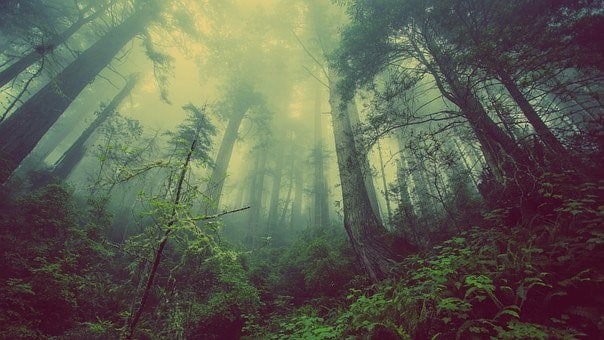
The Nikon D7200 is a very capable DSLR for landscape photography. Its sharp sensor (with no OLPF for extra detail), strong dynamic range, and solid battery life make it a reliable companion for long days outdoors. With practice and the right settings, you can capture some truly impressive landscape photographs with this camera.
How we verify what we publishLast checked October 10, 2026Report an error