How to Work with Nikon Z6 Shutter Speed
Understanding Nikon Z6 shutter speed is one of the most valuable skills you can develop as a photographer. The Z6’s native ISO range of 100-51,200 (expandable to 204,800) and its 3.69-million-dot EVF make it easy to preview exactly how your shutter speed choice affects the final image before you take the shot.
Nikon Z6 Shutter Speed: General Overview
A camera shutter is basically a thin curtain sitting in front of the sensor. It stays closed until you press the shutter button. When you fire the camera, the shutter opens and the sensor gets exposed to light coming through the lens. Once the sensor has collected enough light, the shutter snaps shut again.
Shutter speed refers to how long that shutter stays open. It’s the amount of time your camera takes to capture a single frame. Different shutter speeds produce very different results in your photos, and learning to control this setting gives you a lot of creative power.
Dramatic Effects and Brightness
Shutter speed does two main things. First, it creates dramatic visual effects by either blurring motion or freezing action. Second, it controls how bright or dark your image turns out.
When you set a long (slow) shutter speed, the sensor is exposed to light for a longer period. Moving subjects will appear blurred, creating a sense of motion in the image. This technique is commonly used in car and motorcycle advertisements, where the blurred wheels communicate speed and energy to the viewer.
Nikon Z6 shutter speed – motion blurSlow shutter speeds are also your friend when shooting at night or in dim environments. You can capture well-exposed photos of any subject in low light by slowing things down. Some photographers intentionally use long exposures to create a sense of motion on waterfalls or rivers while keeping everything else in the frame tack-sharp.
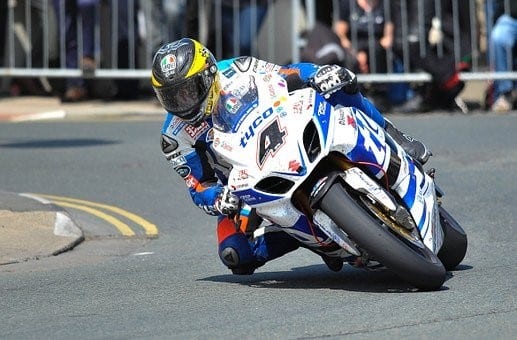
On the flip side, a fast shutter speed freezes motion completely. Even if your subject is moving quickly (a racing bike, a bird in flight, a soccer player mid-kick), a fast enough shutter speed will capture it with zero blur.
How Is Shutter Speed Measured?
Shutter speeds are measured in fractions of a second. For example, 1/4 means a quarter of a second, while 1/250 means one-two-hundred-and-fiftieth of a second (roughly four milliseconds).
Most modern mirrorless cameras, including the Nikon Z6, can shoot at shutter speeds up to 1/8000th of a second using the mechanical shutter. The electronic shutter can go even faster. On the slow end, the Z6 supports exposures up to 30 seconds, plus a Bulb mode for even longer exposures when you need them.
Electronic First Curtain Shutter
The Z6 gives you three shutter options: mechanical, electronic, and Electronic First Curtain. You can find the setting at:
MENU > CUSTOM SETTING MENU (pencil icon) > ‘d’ Shooting/display > ‘d5’ Shutter type.
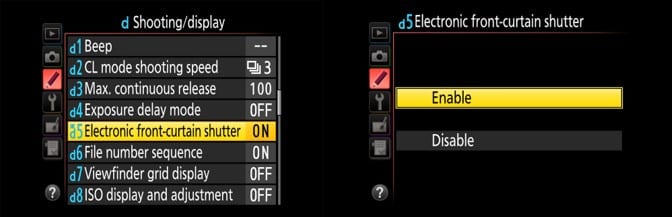
With Electronic First Curtain, the shutter opens silently and only makes a mechanical click when it closes. This helps reduce vibration from the shutter mechanism, which is especially useful when you’re shooting on a tripod. The audible click at the end also lets you know when the exposure is complete.
The fully electronic shutter is completely silent, which is great for weddings, wildlife, and other situations where noise would be disruptive. The tradeoff is that electronic shutters can cause rolling shutter distortion with fast-moving subjects, so keep that in mind.
Auto ISO Minimum Shutter Speed
The Z6 has a smart feature that ties into Auto ISO. You can set a minimum shutter speed threshold, and the camera will automatically raise ISO before it lets the shutter speed drop below that threshold.
If the scene gets so dark that even the maximum programmed ISO isn’t enough, the camera will finally dip below your minimum speed. But in most conditions, this feature keeps your shutter speed fast enough to avoid blur without you having to think about it.

Here are some practical starting points for setting Auto ISO minimum shutter speed:
For a still subject, set it to “1/focal length.” So if you’re using a 50mm lens, the minimum would be 1/50s. This is a classic rule that works well in most situations.
For candid street photography with people walking around, set it to at least 1/125s to keep them sharp.
For sports or action, bump it up to 1/500s or faster to freeze athletes and fast-moving subjects.
The Nikon Z6 is a capable camera for both still and action photography. Once you get comfortable with its shutter speed settings and understand how they interact with ISO and aperture, you’ll have much more control over the look and feel of every image you capture.