When you purchase through links on our site, we may earn an affiliate commission. Here’s how it works.
Canon 90D Wedding Photography Settings
Wedding photography is one of the most rewarding types of shooting, but it demands serious preparation. If you’re using the Canon EOS 90D, you’ve already got a strong camera in hand. The key to great Canon 90D wedding photography comes down to dialing in the right settings before the big day.
The 90D packs a 32.5 Megapixel CMOS (APS-C) sensor and a DIGIC 8 image processor. It also shoots 4K video at 30p. That’s plenty of firepower for wedding work, but you still need to know how to set it up properly.
Here are the settings that’ll help you deliver great results.
Recommended Settings for Canon 90D Wedding Photography
Step 1. Set Up Autofocus
Canon 90D wedding photography – autofocusAt weddings, you’re often shooting close-up portraits in tricky lighting. The camera might grab the wrong focal point, and in dim venues, manually correcting that takes too long.
Switch to single-point autofocus and set the focal point to the center. Then use the half-press technique: press the shutter button halfway to lock focus on your subject, recompose the frame, and fire. This gives you consistent, accurate focus even when the lighting isn’t cooperating.
We break down Canon lens for wedding in a separate post that complements this one.
Step 2. Pick the Right Drive Mode
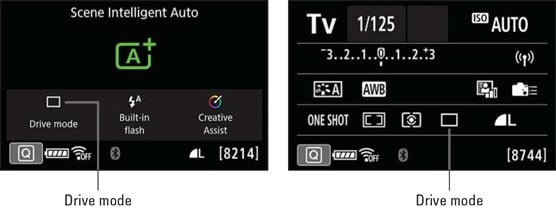
Canon 90D Wedding photography – drive mode
Set your camera to low-speed continuous mode. This lets you fire off several frames quickly to capture fleeting expressions and candid moments without blowing through your memory card.
Weddings move fast. You need to cover the couple, the wedding party, and dozens of guests in a short window. Low-speed continuous gives you that flexibility while keeping your file count manageable.
Step 3. Dial in Manual Settings
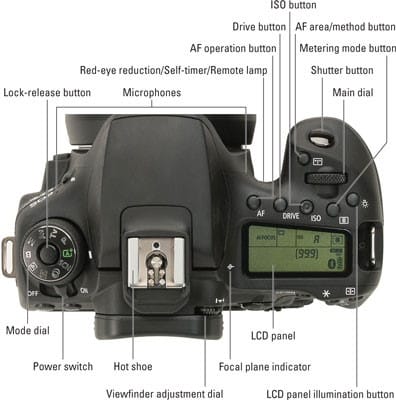
Canon 90D Wedding photography – manual settings
Even though the Canon 90D flip screen camera has that impressive 32.5 Megapixel sensor and DIGIC 8 processor, you still need to take control of manual settings to nail every shot.
The two modes you’ll bounce between most are shutter priority mode and aperture priority mode. Understanding when to use each one is what separates good wedding photos from great ones.
Step 4. Shutter Speed
For sharp portraits of the bride and groom, set your shutter speed to 1/500. That’s fast enough to freeze natural movement and avoid any motion blur.
For a different take, see our guide on Canon 90D wildlife photography.
When you’re capturing wider shots of the venue or guests mingling, you can drop the shutter speed lower. Just keep it above 1/125 to avoid handheld camera shake.
Step 5. Aperture Priority Settings
For couple portraits, keep the aperture between f/1.4 and f/2.8. This gives you beautiful background blur that makes your subjects pop. For group shots, the venue, and wider scenes, increase the aperture value to f/5.6 or higher so everyone stays in focus.
Step 6. Using a Flash
Wedding venues are rarely evenly lit. You’ll find bright spots near windows and dark corners by the dance floor. A good external flash helps you control the lighting no matter where you’re shooting.
The Canon 90D has a built-in flash, but it’s not powerful enough for most wedding situations. An external speedlight gives you much better results, especially when you bounce it off the ceiling for softer, more natural-looking light.
Start with ISO 1600 at f/2.8 with 1/16th flash power as your baseline, then adjust from there based on the venue.
Step 7. Choose a Good Lens
Wedding venues have space constraints, and you can’t always move to get the angle you need. A quality lens makes a huge difference in your Canon 90D wedding photography results.
Macro and prime lenses work well when you need to cover the couple, guests, and venue from a single position. Here are some top picks:
- Canon EF 24-70mm f/2.8L II USM Zoom Lens
- Canon EF 16-35mm f/2.8L III USM
- Canon EF 50mm f/1.2L USM Ultra Fast Lens
- Canon EF 35mm f/1.4L II USM
- Canon EF 85mm f/1.2L II USM AF
- Canon EF 100mm f/2.8L Macro IS USM
- Canon EF 70-200mm f/2.8L IS II USM
