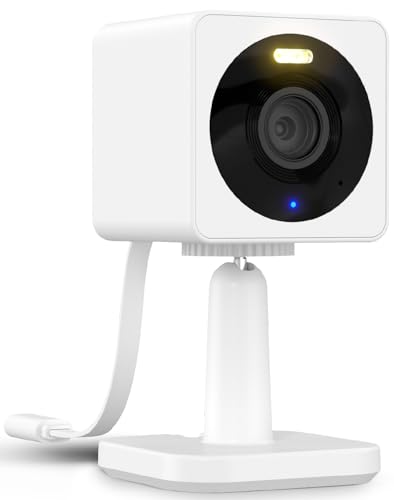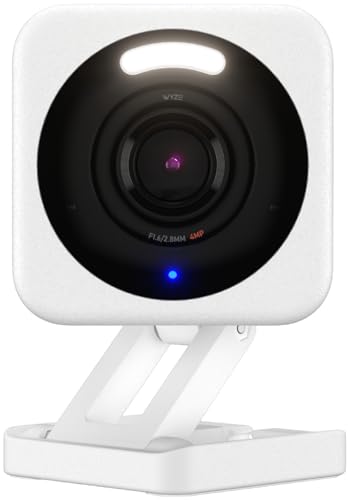
The Wyze security camera punches well above its price tag. Budget-friendly? Absolutely. But it doesn’t cut corners on quality.
With 1080p HD video, infrared night vision, and two-way audio, it holds its own against cameras costing three or four times as much. Most Wyze camera models sit around the $20 to $35 range in 2026, which is pretty wild when you think about what you’re getting.
Let’s break down what makes these cameras tick and whether they’re the right fit for your setup.
Video Quality on the Wyze Security Camera
The standard Wyze Cam delivers solid 1080p HD video with infrared night vision and two-way audio. For a $20 camera, that’s genuinely impressive.
Colors look accurate during daytime, and the image stays sharp enough to make out faces and details from across a room. Night vision switches on automatically when the lights go down, and the infrared LEDs do a decent job illuminating spaces up to about 30 feet away.
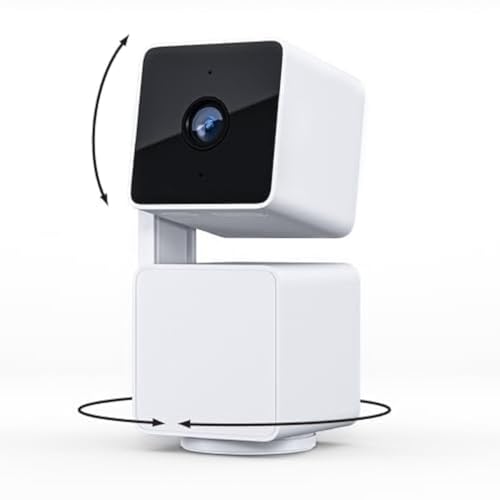
The Wyze Cam Pan steps things up. It costs about $10 more, but you get everything the standard version offers plus 360-degree panning. That extra range of motion makes a real difference when you need to cover a larger room.
The Wyze Cam v3, which has been the standard model through 2026, also includes color night vision using a Starlight sensor. In low-light situations where some ambient light is present, you get color footage instead of the usual black-and-white infrared view. It is a noticeable upgrade for anyone monitoring outdoor areas with streetlights or porch lights nearby.
Standout Features of the Wyze Security Camera
Storage
Here’s something you won’t find on most budget cameras: free local and cloud storage. That’s a big win for the Wyze security camera.
Video captured by the camera saves automatically to the cloud and stays there for 14 days. Since the cameras also have a built-in Micro SD card slot, you can transfer footage to your computer whenever you want.
Compare that to Ring cameras, where you need a monthly subscription for cloud access. Wyze gives it to you straight out of the box.
One thing to keep in mind: the free cloud clips are limited to 12-second events with a 5-minute cooldown between recordings. For continuous cloud recording without gaps, you will need the Cam Plus subscription. But for basic motion alerts and short clips, the free tier works fine.
Integration with Smart Platforms
Connecting your Wyze security camera to Alexa or Google Assistant is straightforward. These cameras also support IFTTT, so you can set up custom automated actions from your device.
Say “Alexa, show me the front door” and your Wyze camera feed pops up on an Echo Show or Fire TV. Google Assistant works the same way with Nest Hub displays. You can also create IFTTT routines that turn on smart lights whenever the camera detects motion, which adds another practical layer to your home setup.
On top of that, Wyze sense security sensors add another layer of protection for your assets and belongings. These include door and window contact sensors and a standalone motion sensor that pair through the Wyze app.
Motion Detection
This is probably the weakest spot on the Wyze security camera. The basic motion detectors can’t tell the difference between a person, an animal, or a random moving object. That can get annoying.
If you’re using these cameras mostly indoors, though, it’s not a major concern. And if you’ve got a bigger budget, there are cameras with smarter motion detection out there.
The Cam Plus subscription does add person detection, pet detection, vehicle detection, and package detection. At around $1.99 per month per camera (or less with an annual plan), it is a reasonable upgrade if false alerts are driving you crazy.
Power Source
The Wyze security camera needs to be plugged into a power outlet, so keep that in mind. The USB cable is about 6 feet long, which gives you some flexibility, but you will still need an outlet within reach.
If there’s no outlet near your preferred location, you’ll want to consider wireless camera options instead. Wyze does sell a battery-powered outdoor camera for situations where wired power is not practical.
But if power access isn’t a problem, this is easily the best security camera you can get in this price range.
Complete Motion Capture
Every Wyze security camera includes a free motion capture feature that records a 12-second video clip when it detects movement.
If you need longer clips, there’s a $1.49 per month plan that gives you full motion capture. That means you get the complete video of any activity, not just a short snippet. For a business or a busy household, the upgrade is usually worth it.
Activity Zones
The Wyze security camera also lets you set up “Activity zones.” You pick which areas within the camera’s view need the most attention and which ones you’d rather ignore.
So instead of getting alerts every time your cat walks by, you can focus the camera on the front door or the driveway. Pretty handy.
Setting up activity zones takes about 30 seconds in the app. You drag a rectangle over the area you want to monitor, give it a name, and save. The camera will only trigger alerts for motion inside that zone.
The Wyze App
Whether you’re controlling the Wyze security camera or checking stored footage, the app handles everything well. It gets even better once you set up IFTTT triggers, adding automation that makes the whole system more useful day to day.
The app also supports grouping cameras. If you have three or four Wyze cameras around your home, you can view all of them on a single screen. The interface is clean, loading times are quick, and firmware updates push through the app automatically.
Wyze Camera Lineup in 2026
Wyze has expanded its camera lineup since the original Wyze Cam launched. Here is a quick look at the current options.
The Wyze Cam v3 is the standard indoor/outdoor camera with color night vision and an IP65 weather rating. The Wyze Cam Pan v2 adds motorized 360-degree panning and tilting for full room coverage. The Wyze Cam OG is a compact, low-cost option designed for quick setup. And the Wyze Battery Cam Pro is the wireless option for locations without nearby outlets.
Each model runs through the same Wyze app, so switching between cameras or adding new ones is simple.
Summing It Up
Wyze security cameras are a great pick if you want solid home security without breaking the bank. They pack in a surprising number of features at a price that’s hard to beat, and they’re reliable enough for everyday use.
In 2026, the Wyze ecosystem has only gotten better. More camera options, smarter detection with Cam Plus, and a polished app make this brand one of the best values in home security. Whether you are watching your front porch or keeping an eye on a small office, Wyze cameras get the job done without a big investment.
See Also