When you purchase through links on our site, we may earn an affiliate commission. Here’s how it works.
5 Best Canon T6i Wedding Photography Settings
Wedding photography is one of those situations where your camera settings can make or break the final result. Things move fast, lighting changes constantly, and you don’t get a second take on most moments.
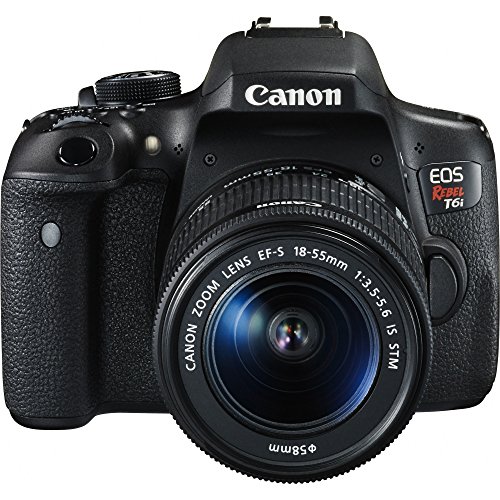
The good news? The Canon T6i handles wedding shoots really well. With its 24.2 MP APS-C CMOS sensor and 19-point autofocus system, it gives you plenty to work with. You just need to know which settings to dial in.
Even in 2026, the Canon T6i remains a popular choice for photographers on a budget. While newer models have hit the market, the T6i’s image quality and feature set still hold up for events like weddings, especially when paired with the right glass.
Here are the Canon T6i wedding photography settings that’ll help you capture better shots on the big day.
1. Focus and Recompose
This technique is a classic for portrait work, and it’s perfect for weddings. Half-press the shutter to lock focus on your subject, then recompose the frame to get the shot you actually want.
For couples portraits, place the bride or groom in the center to lock focus, then shift your composition before pressing the shutter all the way down. It’s a small habit that makes a big difference in the quality of your portraits.
One tip that helps with this technique: switch your autofocus to One-Shot AF mode. This locks focus when you half-press and holds it while you recompose. In AI Servo mode, the camera keeps adjusting focus as you move, which defeats the purpose of recomposing.
You can also assign focus to the back button (AF-ON) instead of the shutter button. This is called back-button focus, and it separates focusing from shooting. Press the back button to lock focus, let go, then recompose and press the shutter whenever you are ready. Many wedding photographers swear by this method because it gives you complete control over when the camera focuses.
2. Use a Fast Shutter Speed
People at weddings are always moving. Guests are walking around, kids are running, and the couple is constantly in motion during the ceremony and reception.
A fast shutter speed keeps everything sharp. Most photographers recommend at least 1/60th of a second for indoor ceremony shots, but you can go faster for the reception or outdoor portions where there’s more movement.
For the first dance or bouquet toss, bump your shutter speed to at least 1/200th of a second. These moments happen fast, and motion blur will ruin an otherwise great shot. If the venue is well-lit or you are shooting outdoors, 1/500th or higher gives you even more flexibility.
When shooting in dimmer venues like churches or banquet halls, keep an eye on your ISO. A faster shutter speed means less light reaching the sensor, so you will need to raise your ISO to compensate. The Canon T6i handles ISO values up to around 1600 to 3200 without too much noise, depending on the lighting conditions.
If you are shooting the ceremony from a fixed position, a tripod or monopod helps you use slightly slower shutter speeds without introducing camera shake. This is especially useful during the vows when movement is minimal and you want to keep ISO as low as possible.
3. Set Auto White Balance
Wedding venues are notorious for mixed lighting. You might have warm tungsten lights on one side and cool daylight coming through windows on the other.
Auto white balance on the Canon T6i does a solid job handling these shifts. To access it, hit the quick settings button near the top right corner of the rear display, then select AWB. It’ll adjust the color temperature shot by shot so you’re not stuck with weird color casts.
That said, if you are shooting in RAW format (which you absolutely should for weddings), white balance is easy to adjust in post-processing. Programs like Adobe Lightroom and Capture One let you change white balance with a single slider after the fact. So even if auto white balance gets it slightly wrong, you can fix it without losing any image quality.
For photographers who prefer manual control, the Canon T6i also lets you set a custom white balance using a gray card. Photograph the gray card under the current lighting, then set that image as your custom white balance reference. This gives you perfectly neutral colors for that specific environment.
4. Go with a Wider Aperture
Aperture controls how much of your image stays in focus, and for wedding photography, you generally want a shallow depth of field for portraits.
Keep your aperture below f/5.0 as a starting point. For close-up couples portraits, shoot between f/1.4 and f/2.8 to get that creamy background blur. When you’re capturing wider group shots or the full venue, bump the aperture up higher so everyone stays sharp.
For group photos, f/5.6 to f/8 is a safe range. At these apertures, everyone in the group should be in focus from front to back. If you shoot a group photo at f/1.8, the people in the front row will be sharp but everyone behind them will be soft, and that is not a photo anyone wants to frame.
Depth of field also changes with distance. The closer you are to your subject, the shallower the depth of field at any given aperture. So a portrait shot at f/2.8 from three feet away will have much more background blur than a full-length shot at f/2.8 from ten feet away. Keep this relationship in mind as you move around the venue.
Another thing to watch: some lenses are softer wide open. If your kit lens shows some corner softness at f/3.5, try stopping down to f/4.5 or f/5.0 for sharper results across the frame.
5. Bring the Right Accessories
Your Canon T6i is capable on its own, but the right accessories take your wedding photography to another level.
A good external flash is one of the most important additions for wedding work. The built-in pop-up flash creates harsh, flat lighting that washes out skin tones. An external speedlight like the Canon 430EX III-RT lets you bounce the flash off the ceiling or walls for softer, more flattering light. This makes a huge difference during receptions where ambient lighting is dim.
Bring extra batteries and memory cards. Weddings are long events, sometimes running 8 to 10 hours. Running out of battery or storage during the reception is a nightmare scenario. Pack at least two fully charged batteries and enough card space for several thousand images.
Tripod
A 360-degree ball head tripod gives your camera a stable platform, which matters a lot during longer exposures or when you’re switching between lenses and battery grips. It also keeps your arms from getting tired during a 6+ hour wedding day.
A monopod is a lighter alternative if you need mobility. It provides enough stabilization for slower shutter speeds while letting you move freely through the venue.
Lenses
Different moments call for different focal lengths. Here are some top lens picks for Canon T6i wedding photography:
- Canon EF 70-200mm f/2.8L IS II USM.
- Canon EF 24-70mm f/2.8L II USM Zoom Lens.
- Canon EF 16-35mm f/2.8L III USM.
- Canon EF 50mm f/1.2L USM Ultra Fast Lens.
- Canon EF 35mm f/1.4L II USM.
- Canon EF 85mm f/1.2L II USM AF.
- Canon EF 100mm f/2.8L Macro IS USM.
The 24-70mm f/2.8 is arguably the most versatile lens for weddings. It covers everything from group shots to close portraits without needing to swap glass. The 70-200mm f/2.8 is ideal for ceremony shots where you can’t get close to the couple. And the 50mm f/1.2 is unbeatable for low-light portraits with beautiful background blur.
See Also