When you purchase through links on our site, we may earn an affiliate commission. Here’s how it works.
Nikon Z6 wedding photography
The Nikon Z6, introduced to us on August 23, 2018, is a full-frame mirrorless camera. It is excellent for capturing wedding photographs. This device has a back-illuminated 24.5-megapixel full-frame BSI-CMOS sensor and an Expeed 6 processor.
This camera offers a native ISO range of ISO 100 to 51,200, expandable up to 50-204,800.
The Nikon Z6 has a 3.69-million-dot viewfinder. The EVF displays an accurate image preview, and a large tilting touchscreen is available at the rear side.
The stabilization of this camera is impressive; to be distinct, the 5-axis sensor-shift stabilization delivers unparalleled results.
The body is made of superior-quality magnesium alloy that is fully weather-sealed. It can shoot video (4K UHD) up to 30 fps and delivers a 10-bit 4:2:2 N-LOG output over HDMI.
Shooting wedding photographs with Nikon Z6
STEP 1. Gather the right gear for wedding photography
To significantly increase the chances of taking mesmerizing wedding photographs, gathering the right equipment and camera is vital.
Bring a backup camera for managing odd circumstances if your primary camera fails.
This kit includes proper lenses, ideally, one wide aperture zoom lens and one prime lens that allows you to roam in the crowd-filled wedding venue without disturbing them too much.
A right wide-angled lens is also needed for capturing perfect venue shots and group photographs. You can make a pick from the following options:
NIKKOR Z 24mm f/1.8 S
NIKKOR Z 35mm f/1.8 S
NIKKOR Z 70-200mm f/2.8
On the other hand, carry a telephoto (either zoom or prime) lens, which is essential for long-distance shots.
Another item that will be useful is a durable tripod to capture sharper and steadier shots.
Also, carry a beneficial external flash, as pop-up flashes are not good enough. The pop-up flashes produce inaccurate, harsh lighting.
Besides, they are not that attractive for portraits. Again, with the external flash, you can direct the flash towards the ceiling and get more natural light and diffused lighting if you don’t have a diffuser.
And last but not least, pack an extra pair of batteries.
STEP 2. Pick the best memory cards for easy storage
One of the best tips for wedding photography is to shoot in RAW format, but as RAW files are big and store a lot of data in your memory card, it is advised to get memory cards with a larger storage capacity.
You should purchase a memory card with a “write” speed – measured as MB/s.
The speed written on the card is the transfer speed (the speed at which your files are transferred to the computer from the memory card).
An excellent transfer speed is good, but a faster write speed (such as 95mb/s), which can easily handle a continuous burst of RAW photos, is also essential.
STEP 3. Try black and white photograph
The advantage of shooting in RAW format is that you can convert your files later. If you have trouble seeing contrast, you can shoot in this format.
It makes capturing wedding photographs much more straightforward as the colors won’t distract you anymore, and you can convert them into color photographs during the post-production tasks.
Also, black and white photography is beneficial regarding unpredictable lighting conditions during the wedding.

Nikon Z6 wedding photography settings – raw format
STEP 4. Take control of shutter speed
Shutter speed is the length of time when your camera’s digital sensor is revealed to the light. To make it precise, it determines how long it will take to take a shot.
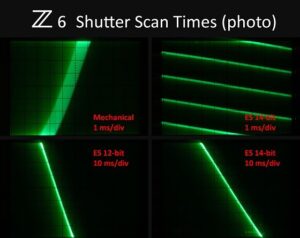
Nikon Z6 wedding photography settings – wedding
So, one of the simplest wedding photography tips is to avoid applying deficient shutter speed (below 1/250 seconds) as it will vary from person to person as to how steady their hand is, but keeping it a minimum is recommended for taking the best wedding photographs.
See Also