When you purchase through links on our site, we may earn an affiliate commission. Here’s how it works.
How to Adjust Nikon D90 Landscape Settings
Your Nikon D90 landscape settings can make a real difference in the quality of your outdoor photography. Released in 2008 as the follow-up to the D80, the D90 packs a 12.3-megapixel DX-format CMOS sensor that still holds up for landscape work. Its ISO range runs from 200 to 3200 (expandable to 100-6400), and it has a 3-inch LCD screen that was impressive for its era. The D90 can also record video in Motion JPEG format, which made it the first Nikon DSLR to offer video recording.
What really helps with landscape shooting is the D90’s 420-pixel RGB sensor for exposure metering. It reads both color and brightness data alongside the autofocus info, giving you more accurate exposure balance across the entire frame. You also get an 11-point autofocus system arranged in a diamond pattern (similar to the pro-grade D3 and D300), plus 3D tracking for keeping moving subjects in focus when you need it.
Tips for the Best Nikon D90 Landscape Settings
STEP 1. Use a Polarizing Filter
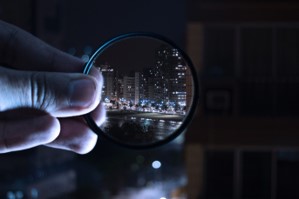
Nikon D90 Landscape – Polarizing Filter
A polarizing filter is one of the most useful accessories you can put on your D90 for landscape work. It blocks specific wavelengths of light, which cuts down on glare from water, glass, and wet surfaces. The practical result? Deeper blue skies, richer greens in foliage, and less atmospheric haze in distant scenes. Just rotate the filter while looking through the viewfinder until the effect looks right. Keep in mind that a polarizer works best when you’re shooting at roughly 90 degrees to the sun.
STEP 2. Keep ISO Low During the Day, Raise It at Night
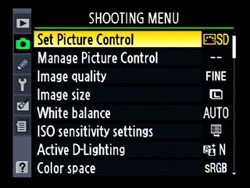
Nikon D90 Landscape settings ISO
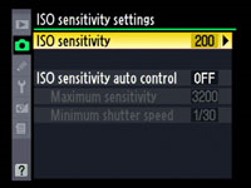
Nikon D90 Landscape settings ISO Sensitivity
ISO controls how sensitive the sensor is to light, and higher values introduce more noise and grain into your photos. For daytime landscape photography, stick to ISO 200 (the D90’s base ISO) for the cleanest possible images. When shooting at twilight, golden hour, or at night, you’ll need to bump the ISO higher to keep your shutter speed fast enough. The D90 handles ISO 800 reasonably well, but above ISO 1600 you’ll start seeing noticeable grain. If you’re shooting on a tripod, there’s no reason to go above ISO 200 during the day since you can simply use a longer exposure instead.
STEP 3. Add Wide-Angle Lenses for Better Compositions
Nikon D90 Landscape Lens – Wide AngleThe kit lens that comes with the D90 is decent, but a dedicated wide-angle lens opens up your landscape compositions dramatically. The Tokina 11-16mm f/2.8 is a popular choice for DX-format cameras like the D90. It gives you an ultra-wide field of view that’s perfect for sweeping vistas, and the f/2.8 aperture means it performs well in low light too. Other solid options include the Nikon 10-24mm f/3.5-4.5 and the Sigma 10-20mm f/3.5. A wider lens also gives you greater depth of field at any given aperture, which means more of the scene stays sharp from foreground to background.
STEP 4. Use ND Filters for Creative Long Exposures
Nikon D90 Landscape Settings – ND FilterND (neutral density) filters are like sunglasses for your lens. They reduce the amount of light entering the camera without changing the color of the image. Why does that matter for landscape photography? Because they let you use much longer shutter speeds in bright conditions. A 3-stop or 6-stop ND filter lets you create silky smooth water effects in waterfalls and rivers, blur moving clouds across the sky, and add a sense of motion to your scenes. Without an ND filter, you’d blow out the exposure trying to use slow shutter speeds in daylight. Variable ND filters are convenient since you can dial the density up or down, though fixed ND filters typically produce slightly sharper results.