ASUS makes more gaming laptops than any other brand, and the lineup can be confusing. Four distinct product lines sit under the ASUS umbrella, each targeting a different type of gamer. Some prioritize raw power. Others chase portability or value. Picking the right one comes down to understanding what separates them and matching that to how you actually play.
This guide breaks down every ASUS gaming laptop line available in 2026. It covers the hardware that matters, the price brackets you should expect, and which line fits your needs best.
What are the different ASUS gaming laptop lines?
ASUS organizes its gaming laptops into four main product families. Each one serves a specific audience, and there is surprisingly little overlap between them once you understand the design philosophy behind each line.
ROG Strix is the flagship performance line. ROG Zephyrus is the premium ultraportable line. TUF Gaming is the budget and mid-range line. ROG Flow is the convertible and portable gaming line. Every model within these families shares a set of design principles, cooling strategies, and target price points that stay consistent from year to year.
| Product Line | Focus | Weight Range | Price Range | Best For |
|---|---|---|---|---|
| ROG Strix | Maximum performance | 4.8 to 6.2 lbs | $1,500 to $3,500+ | Hardcore gamers, esports pros |
| ROG Zephyrus | Premium thin and light | 3.3 to 4.4 lbs | $1,800 to $3,500+ | Creators, professionals, portable power users |
| TUF Gaming | Durability and value | 4.4 to 5.5 lbs | $800 to $1,600 | Budget gamers, students, first gaming laptop |
| ROG Flow | Convertible portability | 3.5 to 4.6 lbs | $1,300 to $2,500 | Portable gaming, tablet mode users, travel |
What is the ASUS ROG Strix and who is it for?
The ROG Strix line is where ASUS puts its most powerful gaming hardware. These laptops carry top-tier GPUs, high-wattage processors, and aggressive cooling systems designed to sustain peak performance during long gaming sessions. If you want the fastest frame rates ASUS offers in a laptop, this is the line to look at.
Strix laptops come in 15-inch, 16-inch, and 18-inch screen sizes. The larger models pack desktop-class cooling with liquid metal thermal compound and oversized heat pipes. Display options include 240Hz and 360Hz panels, which matters if you play competitive shooters where every millisecond counts.
The trade-off is size and weight. Strix models are thick and heavy compared to the rest of the lineup. They are not the laptops you want to carry around campus all day. Think of them as portable desktops that happen to fold shut. Battery life runs between three to five hours for general use, and significantly less under gaming load.
The ROG Strix line suits gamers who play at a desk most of the time but want the option to move their setup between rooms or bring it to a LAN party. Esports players benefit from the high refresh rate displays and low-latency features ASUS builds into these machines.
How does the ROG Zephyrus compare to the ROG Strix?
The ROG Zephyrus takes a fundamentally different approach. Where the Strix chases maximum power, the Zephyrus chases the best possible performance inside a thin, light, premium chassis. These laptops use CNC-machined aluminum bodies, OLED displays, and refined cooling systems that stay quieter than their Strix counterparts.
Zephyrus models typically weigh between 3.3 and 4.4 pounds. That is a significant drop compared to a 6-pound Strix. The build quality feels closer to a MacBook Pro than a traditional gaming laptop. You can take a Zephyrus to a client meeting and nobody would guess it runs AAA games at high settings.
Performance sits slightly below the Strix because the thinner chassis limits how much heat the cooling system can dissipate. GPU wattage is lower, which translates to roughly 10 to 15 percent fewer frames per second in demanding titles. For most gamers, that gap is invisible. You will still run modern games at high settings with smooth frame rates.
Content creators gravitate toward the Zephyrus for good reason. The OLED display options offer excellent color accuracy for photo editing, video grading, and design work. These screens cover 100 percent of the DCI-P3 color gamut and deliver true blacks that IPS panels cannot match. If your laptop pulls double duty between gaming and creative work, the Zephyrus handles both roles well.
Is the ASUS TUF Gaming laptop worth buying?
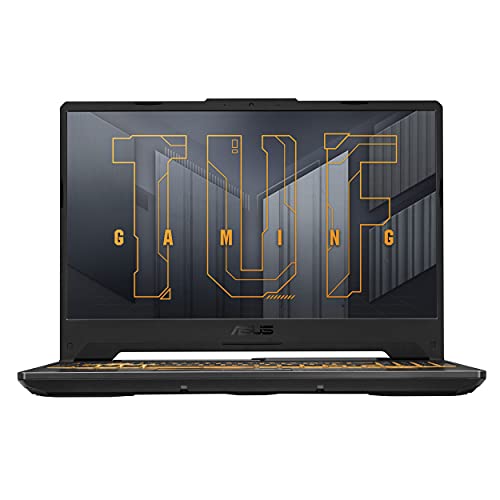
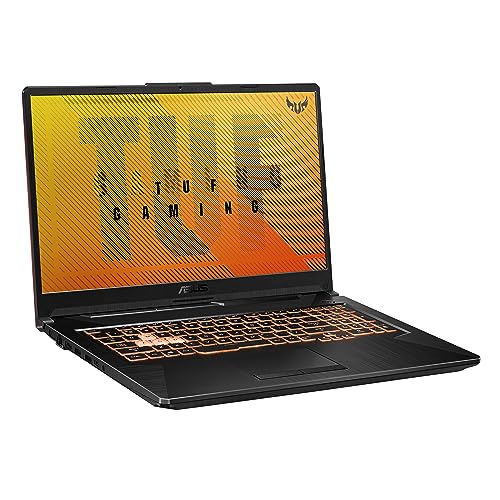
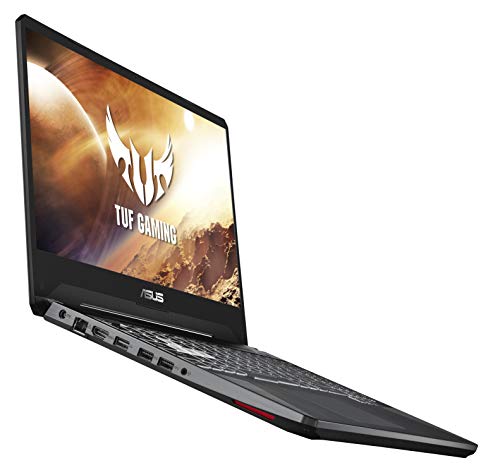
The TUF Gaming line is ASUS’s value-oriented gaming laptop family, and it punches above its weight. These machines cost significantly less than ROG models while still delivering solid gaming performance. The build quality includes MIL-STD-810H military-grade durability testing, which means they are built to handle drops, vibrations, and temperature extremes better than most laptops at their price.
If you want to go deeper, we have a separate guide on HP laptop for gaming.
TUF laptops use mid-range GPUs and processors that handle most games at 1080p with high settings. The displays typically run at 144Hz or 165Hz, which is more than enough for casual and competitive gaming alike. Cooling is adequate but not as advanced as what you find in ROG models. Expect slightly higher temperatures and louder fans under heavy load.
Where TUF Gaming makes the most sense is for students and first-time gaming laptop buyers. The price-to-performance ratio is hard to beat. You get a capable gaming machine that also handles schoolwork, streaming, and everyday tasks without breaking the bank. These laptops also tend to be more repairable, with accessible RAM and storage slots for future upgrades.
The compromises show up in areas like display quality, speaker audio, and trackpad feel. TUF screens are functional but lack the color accuracy and brightness of ROG panels. The keyboard is solid for gaming but does not have the per-key RGB lighting that Strix models offer. These trade-offs are reasonable for the price, but they are worth knowing about upfront.
What makes the ROG Flow different from other ASUS gaming laptops?
The ROG Flow line breaks convention by offering convertible designs with touchscreen displays that rotate 360 degrees. You can use a Flow laptop in traditional laptop mode, tent it up for a movie, or fold it flat as a tablet. It is ASUS’s answer to gamers who want versatility above all else.
Flow models come in smaller form factors, with 13-inch and 16-inch options. The 13-inch ROG Flow Z13 is essentially a gaming tablet with a kickstand and detachable keyboard. It is one of the most portable gaming devices on the market that still runs full Windows games. The 16-inch ROG Flow X16 offers more screen real estate and stronger hardware while keeping the convertible design.
Some Flow models support the ROG XG Mobile, an external GPU dock that connects via a proprietary interface. This lets you game with desktop-class graphics power at your desk, then unplug and take the lightweight laptop on the go. It is a niche setup, but it solves the portability versus performance problem in a way no other laptop line does.
The Flow is ideal for gamers who travel frequently, use their laptop in multiple form factors, or want a gaming machine that doubles as a tablet for media consumption and note-taking. Performance sits between TUF and Zephyrus depending on the model and configuration.
What GPU should you look for in an ASUS gaming laptop?
The GPU is the single most important component for gaming performance. In 2026, ASUS gaming laptops ship with NVIDIA GeForce RTX 50-series and RTX 40-series GPUs, along with some AMD Radeon RX options in select TUF models. The GPU you need depends entirely on what resolution you play at and which games you run.
For 1080p gaming at high frame rates, an RTX 4060 or RTX 5060 handles nearly everything comfortably. Competitive titles like Valorant, Counter-Strike 2, and Fortnite will push well past 144 frames per second. Demanding single-player games like Cyberpunk 2077 and Alan Wake 2 will run at 60 to 90 fps with high settings.
For 1440p or 4K gaming, you want an RTX 4070 or higher. The RTX 5070 and RTX 5080 are the sweet spots for high-resolution gaming in 2026, delivering strong ray tracing performance and enough VRAM to handle texture-heavy games. The RTX 5090 Mobile sits at the top and is reserved for flagship Strix and Zephyrus configurations.
Keep in mind that laptop GPUs run at lower wattages than their desktop counterparts. A laptop RTX 5070 will not match a desktop RTX 5070 in raw performance. The gap varies by chassis and cooling design, which is why the same GPU can perform differently across ASUS product lines.
What CPU and RAM specs matter for gaming laptops?
Modern games lean heavily on the GPU, but the CPU still matters for frame pacing, minimum frame rates, and background tasks. ASUS uses both Intel Core and AMD Ryzen processors across its gaming lineup. In 2026, the latest options include Intel Core Ultra (Arrow Lake) and AMD Ryzen 9000 series chips.
For pure gaming, any current-generation 8-core processor is more than enough. The difference between a Ryzen 7 and Ryzen 9, or an Intel Core Ultra 7 and Core Ultra 9, shows up mainly in productivity workloads like video rendering, 3D modeling, and heavy multitasking. If you game and stream simultaneously, the extra cores help. Otherwise, save the money and put it toward a better GPU.
For related tips, check out our full guide on gaming laptops.
RAM should be 16 GB at minimum in 2026. Several newer games already recommend 16 GB, and a few titles push into 32 GB territory. If you plan to keep your laptop for three or more years, 32 GB gives you comfortable headroom. Check whether the laptop uses soldered or socketed RAM before buying. Soldered RAM cannot be upgraded later.
How important is display refresh rate on a gaming laptop?
Display refresh rate determines how many frames per second the screen can show. A 60Hz display shows 60 frames per second. A 240Hz display shows 240. Higher refresh rates make motion look smoother and reduce perceived input lag, which gives a noticeable advantage in fast-paced games.
The refresh rate you need depends on what you play. Competitive FPS players benefit the most from 240Hz or 360Hz panels because the smoother motion makes tracking targets easier. Casual gamers and RPG fans will find 144Hz or 165Hz more than sufficient. Going above 165Hz delivers diminishing returns outside of competitive gaming scenarios.
Panel type matters alongside refresh rate. ASUS uses IPS panels across most of its gaming lineup and reserves OLED for premium Zephyrus and select Strix models. OLED displays offer perfect contrast ratios, vivid colors, and faster pixel response times than IPS. The downside is potential burn-in risk with static elements displayed for extended periods, though modern OLED panels include mitigations for this.
Response time is another spec worth checking. A display might run at 240Hz, but if its pixel response time is slow, you will see ghosting and motion blur. Look for panels with 3ms or faster response times. Most ASUS gaming laptops in 2026 advertise 1ms to 3ms response times on their higher-end displays.
How does cooling work on ASUS gaming laptops?
Cooling design separates a good gaming laptop from a great one. The same GPU and CPU can deliver very different performance depending on how well the laptop manages heat. ASUS invests heavily in cooling technology across its gaming lineup, but each product line takes a different approach based on its size and thermal budget.
ROG Strix models use the most aggressive cooling. Expect large vapor chambers, multiple heat pipes, liquid metal thermal compound on the CPU, and dual or triple fan designs. The 18-inch Strix models have enough surface area for oversized heatsinks that keep temperatures below 85 degrees Celsius even during sustained gaming. Fan noise is the trade-off. These machines get loud under full load.
ROG Zephyrus models use a refined version of the same technology, optimized for thin chassis. ASUS fits vapor chambers and liquid metal into bodies under 20mm thick, which is an engineering achievement. Temperatures run slightly higher than Strix, typically peaking around 90 degrees Celsius. Fan noise stays more controlled thanks to smaller, faster-spinning fans with anti-dust tunnels.
TUF Gaming models rely on simpler cooling with standard thermal paste, fewer heat pipes, and dual-fan setups. The cooling gets the job done for mid-range components but runs warmer and louder than ROG alternatives. Cleaning dust from TUF laptops regularly helps maintain thermal performance over time.
Which ASUS gaming laptop specs should you compare?
Choosing between these laptops is easier when you see the key specs side by side. This table compares representative configurations from each line to show how they stack up in the areas that matter most for gaming.
| Spec | ROG Strix (16/18″) | ROG Zephyrus (14/16″) | TUF Gaming (15/16″) | ROG Flow (13/16″) |
|---|---|---|---|---|
| GPU Options | RTX 5070 to RTX 5090 | RTX 5060 to RTX 5080 | RTX 4060 to RTX 5070 | RTX 4060 to RTX 5070 |
| CPU Options | Core Ultra 9 / Ryzen 9 | Core Ultra 9 / Ryzen 9 | Core Ultra 7 / Ryzen 7 | Core Ultra 7 / Ryzen 9 |
| RAM | 16 GB to 64 GB | 16 GB to 32 GB | 8 GB to 32 GB | 16 GB to 32 GB |
| Display Refresh | 240Hz to 360Hz | 120Hz to 240Hz OLED | 144Hz to 165Hz | 165Hz to 240Hz |
| Cooling | Vapor chamber, liquid metal | Vapor chamber, liquid metal | Standard paste, dual fan | Vapor chamber, dual fan |
| Build Material | Aluminum and plastic | CNC aluminum | Plastic with metal lid | Magnesium alloy |
| Battery Life (General Use) | 3 to 5 hours | 6 to 10 hours | 4 to 7 hours | 5 to 8 hours |
| Weight | 4.8 to 6.2 lbs | 3.3 to 4.4 lbs | 4.4 to 5.5 lbs | 3.5 to 4.6 lbs |
| Price Range | $1,500 to $3,500+ | $1,800 to $3,500+ | $800 to $1,600 | $1,300 to $2,500 |
How to choose the right ASUS gaming laptop for you
- Decide on your primary use case. Pure gaming favors Strix. Mixed gaming and creative work fits Zephyrus. Budget gaming points to TUF. Portability and versatility suit Flow.
- Set your budget. If you have under $1,000, TUF Gaming is your only option. Between $1,000 and $2,000 opens up every line except the highest Strix and Zephyrus configurations. Above $2,000 gives you full access to flagship hardware.
- Pick your GPU based on your target resolution. Match RTX 4060 or 5060 to 1080p gaming. Match RTX 5070 or higher to 1440p and 4K gaming.
- Check the display specs. Competitive gamers should prioritize 240Hz or faster. Everyone else should look for at least 144Hz with a fast response time.
- Consider portability. If you carry your laptop daily, rule out anything over 5 pounds. Zephyrus and Flow are the lightest options.
- Look at the RAM and storage configuration. Start with 16 GB RAM and 512 GB SSD at minimum. Prefer models with upgradeable RAM and a second M.2 slot for future expansion.
Frequently Asked Questions
Is ROG better than TUF for gaming?
ROG laptops deliver better gaming performance because they use higher-wattage GPUs, more advanced cooling, and higher refresh rate displays. TUF laptops are not bad for gaming, though. They handle 1080p gaming at high settings perfectly well. The difference shows up when you push into 1440p resolution, enable ray tracing, or play the most demanding AAA titles. If your budget allows for ROG, the performance gap is worth the extra cost. If not, TUF still gets the job done.
How long do ASUS gaming laptops last?
With proper care, an ASUS gaming laptop should last four to six years before the hardware feels dated. TUF models are built to MIL-STD-810H standards, which gives them an edge in physical durability. ROG models use premium materials that age well. Regular cleaning of the cooling system, keeping the laptop on a flat surface for airflow, and avoiding extreme temperatures will extend the lifespan of any gaming laptop.
Can you upgrade the RAM and storage on ASUS gaming laptops?
It depends on the model. TUF Gaming laptops are the most upgrade-friendly, with accessible RAM slots and M.2 SSD bays. ROG Strix models typically offer upgradeable storage and sometimes upgradeable RAM. ROG Zephyrus models often use soldered RAM that cannot be replaced, so choose your configuration carefully at purchase. Check the specific model’s spec sheet before buying if upgradeability matters to you.
Are ASUS gaming laptops good for content creation?
The ROG Zephyrus line is excellent for content creation thanks to its OLED display options, wide color gamut coverage, and strong CPU performance. Video editors, photographers, and graphic designers use Zephyrus laptops as daily drivers. ROG Strix models work well for heavy rendering tasks thanks to their powerful hardware. TUF Gaming handles basic editing but is not ideal for color-critical work due to its less accurate displays.
Do ASUS gaming laptops overheat?
All gaming laptops generate significant heat under load, and ASUS models are no exception. The ROG Strix and Zephyrus lines manage heat effectively with vapor chambers and liquid metal thermal compound, keeping temperatures within safe operating ranges. TUF models run warmer but stay within acceptable limits for their components. Using a laptop cooling pad, keeping vents clear, and regularly cleaning dust from the fans helps prevent thermal throttling on any gaming laptop.
Sources
ASUS ROG – rog.asus.com, ASUS TUF Gaming – asus.com, NVIDIA GeForce – nvidia.com, Intel – intel.com, AMD – amd.com, Tom’s Hardware Laptop Reviews – tomshardware.com, Notebookcheck – notebookcheck.net