Best Henge Docks Vertical Docking Stations
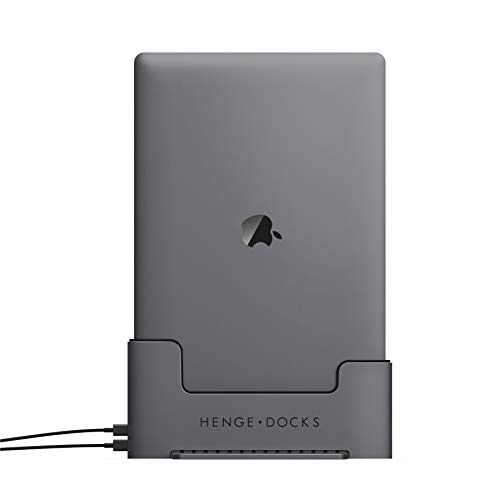
The Henge Docks vertical docking station is a great option for anyone who wants the functionality of a laptop, media center, desktop PC, and more, all from one computer.
![LandingZone Dock Docking Station for The MacBook Pro [Model A1398] with Retina Display (15-inch MacBook)](https://www.technowifi.com/wp-content/uploads/2026/08/landingzone-dock-docking-station-for-the-macbook-pro-model-a1398-with-retina.jpg)
It also helps save desk space while keeping all your laptop features accessible.
The vertical docking station for the MacBook Air also requires no setup at all. Just plug in and play.
The Benefit of Using Henge Docks Vertical Docking Station
The Henge docking station is a real lifesaver for all the multitaskers out there. The best part is the dock’s vertical design, which saves space and effort on your desk.
All versions of this docking station from Henge are beautifully designed and are available for MacBook Pro versions.
Each one is super slim and comes with a design that matches the MacBook perfectly. Some are also made from high-grade aluminum, which ensures durability over time.
1. Henge Docks for 13-inch MacBook Air
This is the MacBook Air dock that lets you incorporate the MacBook Air right into your desktop setup.
You can also use it with a home theatre setup. This way, you get the best features of a desktop, laptop, and media center PC.
So you can build your entire networking system from one computer.
On a similar note, our thunderbolt 3 dock for MacBook Pro article has more practical tips.
Its design makes it stand out among all the other docking stations in the same segment. And there’s never a need for any extra hardware, software, or computer settings.
The dock also supports the Mini DisplayPort. It’s compatible with current models that come with the Thunderbolt facility.
However, it’s not compatible with Thunderbolt devices like the Apple Thunderbolt display.
2. Henge Vertical Dock Retina Display
This dock comes with a clean, simple, and elegant design with polished integration between laptop, desktop, and home theatre.
However, it doesn’t share compatibility with the 2016-2018 MacBook Pro. It also doesn’t support USB-C and Thunderbolt 3 ports.
Still, you don’t need cable connectors when you have this docking station, giving it an edge over its competitors.
The Thunderbolt 3 docking station is fully compatible with Apple and delivers excellent performance.
With the retina display feature, minimal setup, maximum versatility, and the pre-installed Mini DisplayPort, this system really stands out.
We walk through HP docking station compatibility step by step in a separate post.
The instant peripheral connection supports dual monitors, and that’s a real win for multitaskers.
3. Henge Docks Docking Station for Plastic MacBook 2006-2009
This docking station is best for older MacBooks because it can lock the cables while making the ports accessible.
There’s only one drawback: you need to mount the cable separately with hex screws. You’ll have to tighten them so it doesn’t slide down.
This is the perfect dock for a nice, clean, and organized way of using the MacBook as a desktop.
You can also use your laptop as your main recording setup. The clutter-free design works great in an office environment too.
It gives you the dual benefit of saving disk space and reducing cluttered cable connections.
The versatility you get with this docking station is impressive. It requires no setup at all; just plug in and play.
Bottom Line for Henge Docks Vertical Docking Station
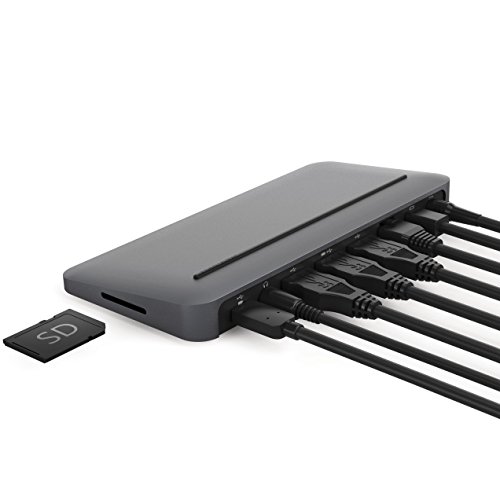
The Henge Docks vertical docking station easily eliminates the mess of dangling cables. Cables run from the bottom of the dock to connect peripherals without any lag.
When you choose the Henge vertical docking station, you can count on avoiding all the frustration of cluttered connections.
If you want a built-in cable management system that supports everything in a vertical position, these docking stations are worth picking up.