
Acer makes some of the most portable laptops you can buy in 2026. The company sells compact Windows machines under its Swift lineup and lightweight Chromebooks under the Chromebook Spin brand. Whether you want a thin OLED ultrabook for work or a budget convertible for school, there is an Acer mini laptop that fits.
This guide covers five current models across the Acer compact lineup. Each one targets a different type of buyer, and the price range stretches from around $380 to $1,500. Below you will find specs, display details, battery life, build quality, and a comparison table that puts everything side by side.
What Makes Acer Compact Laptops Worth Considering in 2026
Acer splits its portable laptops into two families. The Swift series runs Windows and targets users who need full desktop-grade software. The Chromebook Spin series runs ChromeOS and works well for browsing, schoolwork, and cloud-based tasks. Both families include 2-in-1 convertible options with touchscreens and 360-degree hinges.
For 2026, Acer has updated its compact lineup with new processors from Intel, Qualcomm, and MediaTek. Battery life has improved across the board. The Swift Go 14 AI now pushes past 20 hours in testing, and even the budget Chromebook Spin 311 lasts roughly 14 hours on a charge.
Build quality varies by price point. The Swift Go 14 AI uses anodized aluminum and weighs as little as 2.5 pounds. The Chromebook Spin 311 uses plastic but keeps things light at under 3 pounds. Every model in this guide weighs under 3.5 pounds, making them all genuinely portable.
Acer Swift Go 14 AI Specs and Features
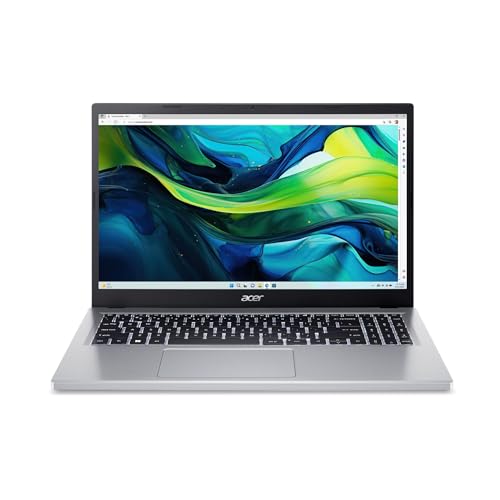
The Swift Go 14 AI is Acer’s flagship compact laptop for 2026. It runs an Intel Core Ultra processor from the Panther Lake generation, paired with Intel Arc B390 integrated graphics. You can configure it with up to 32GB of RAM and a 1TB SSD. The machine qualifies as a Copilot+ PC with built-in AI acceleration.
Its 14-inch OLED display is the standout feature. Higher-end configurations offer a 2.8K resolution panel with a 120Hz refresh rate, while the base model uses a 1920×1200 OLED at 60Hz. Colors are vibrant, blacks are true black, and the screen handles photo editing and video streaming equally well.
Battery life is exceptional. Independent testing shows roughly 21 hours of runtime, thanks to the efficient Panther Lake platform and a 71Wh battery. That is enough to get through a full workday and evening without reaching for the charger.
Port selection is solid for a thin laptop. You get two USB4 Type-C ports with power delivery and display output, two USB-A ports, a full-size HDMI port, and a 3.5mm headphone jack. The aluminum chassis weighs between 2.5 and 2.9 pounds depending on configuration.
Pricing starts around $750 for the Snapdragon X Plus variant and goes up to $1,300 for the Intel Panther Lake OLED model. This laptop suits productivity users, frequent travelers, and anyone who values a premium display in a lightweight package.
Acer Swift Spin 14 AI Overview and Performance
The Swift Spin 14 AI is Acer’s convertible alternative to the Swift Go. It uses a 360-degree hinge that lets you flip between laptop, tent, display, and tablet modes. Inside, it runs a Snapdragon X2 Elite or Snapdragon X2 Plus processor with up to 100 TOPS of AI performance.
This model ships with an Acer Active Stylus that supports Wacom AES 2.0 technology and 4,096 pressure levels. Artists, note-takers, and anyone who marks up documents will appreciate the included pen. Not many convertibles at this price bundle a stylus in the box.
You might also want to read our mini laptop under 300 guide for the full picture.
The 14-inch WUXGA display runs at 120Hz and covers 100% of the sRGB color space. It is not OLED like the Swift Go, but the IPS touchscreen is responsive and sharp enough for everyday tasks. RAM tops out at 32GB, and storage goes up to 1TB.
Acer claims 23 hours of video playback and 16.5 hours of web browsing from the battery. Those numbers have not been independently verified yet, since the laptop just opened for preorders in late July 2026 at $1,500 with shipping in mid-August. It targets creative professionals and students who want pen input and tablet flexibility.
Acer Chromebook Spin Models Compared
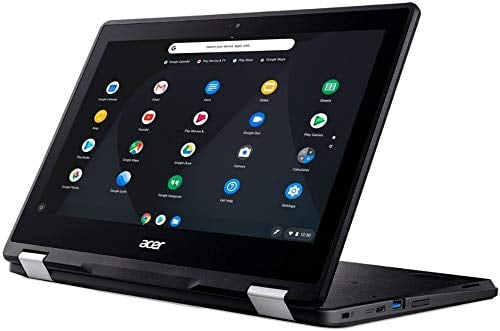
Acer sells three Chromebook Spin models in 2026, each aimed at a different budget and use case. All three feature 360-degree hinges and touchscreens for tablet-style use. They run ChromeOS, which means fast boot times, built-in virus protection, and automatic updates.
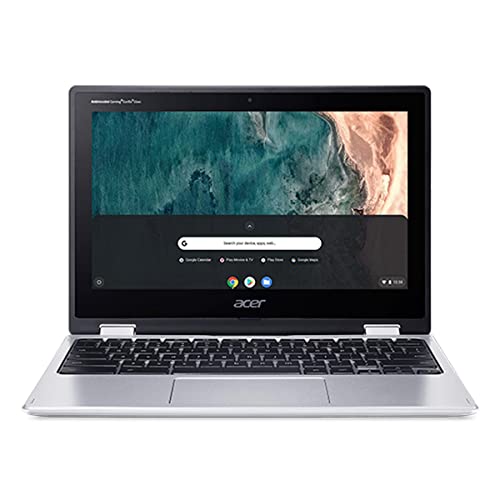
The Chromebook Spin 311 is the entry-level option. It has an 11.6-inch display at 1366×768 resolution, a MediaTek Kompanio 540 processor, and 4GB of RAM. Battery life reaches about 14 hours in real-world use. It costs between $380 and $580 depending on the retailer and region, making it one of the most affordable convertible Chromebooks available.
The Chromebook Plus Spin 514 steps up significantly. Its MediaTek Kompanio Ultra 910 chip is one of the most powerful ARM processors in any Chromebook. The 14-inch display jumps to 2880×1800 resolution, and RAM doubles to 12GB with 256GB of UFS storage. A 70Wh battery delivers up to 17 hours of use. Expect to pay between $700 and $800.
The Chromebook Plus Spin 714 sits at the top. It uses an Intel Core Ultra 5 115U processor, includes Thunderbolt 4 connectivity, and has an aluminum build. The 14-inch FHD+ IPS display is sharp and bright. WiFi 6E, HDMI 2.0, and a 1440p webcam round out the feature set. Pricing ranges from $700 to $800.
Which Acer Compact Laptop Is Right for You
Your ideal pick depends on what you plan to do with the laptop and how much you want to spend. Someone who needs full Windows software, a gorgeous display, and all-day battery life should look at the Swift Go 14 AI. It handles office work, photo editing, and streaming without breaking a sweat.
If you draw, sketch, or take handwritten notes regularly, the Swift Spin 14 AI is the better choice. The included stylus and convertible form factor make it a natural fit for creative workflows. Just be aware that it carries a premium price tag near $1,500.
Students and families on a budget should consider the Chromebook Spin 311. It does not have much power, but it handles web browsing, Google Docs, video calls, and streaming just fine. The long battery life means kids can use it all day at school without needing a charger.
For ChromeOS users who want more screen quality and processing muscle, the Chromebook Plus Spin 514 and 714 both deliver. The 514 offers a sharper display and ARM-based efficiency, while the 714 gives you Intel performance and Thunderbolt 4 for connecting external monitors and docks.
Acer Mini Laptop Comparison Table
| Model | Processor | Display | RAM | Storage | Battery Life | Weight | Price Range |
|---|---|---|---|---|---|---|---|
| Swift Go 14 AI | Intel Core Ultra (Panther Lake) | 14″ OLED, up to 2.8K 120Hz | Up to 32GB | Up to 1TB SSD | ~21 hours | 2.5 to 2.9 lbs | $750 to $1,300 |
| Swift Spin 14 AI | Snapdragon X2 Elite/Plus | 14″ IPS, 1920×1200, 120Hz, touch | Up to 32GB | Up to 1TB SSD | ~17 to 23 hours (claimed) | ~3.0 lbs | ~$1,500 |
| Chromebook Spin 311 | MediaTek Kompanio 540 | 11.6″ IPS, 1366×768, touch | 4GB | 64GB eMMC | ~14 hours | ~2.6 lbs | $380 to $580 |
| Chromebook Plus Spin 514 | MediaTek Kompanio Ultra 910 | 14″ IPS, 2880×1800, 60Hz, touch | 12GB | 256GB UFS | ~17 hours | ~3.2 lbs | $700 to $800 |
| Chromebook Plus Spin 714 | Intel Core Ultra 5 115U | 14″ IPS, 1920×1200, touch | 8GB | 256GB SSD | ~10 hours | 3.2 lbs | $700 to $800 |
How Does Display Quality Compare Across Models
The Swift Go 14 AI has the best screen in this lineup by a wide margin. OLED technology produces perfect blacks, vivid colors, and high contrast ratios that IPS panels cannot match. If you watch movies, edit photos, or simply enjoy a great-looking screen, the OLED display justifies the higher price on its own.
Interested in this area? We go deeper in our Acer vs. HP Chromebook guide.
The Chromebook Plus Spin 514 takes second place with its 2880×1800 resolution panel. Text looks crisp, and the extra pixels help when multitasking with two windows side by side. The main drawback is its 60Hz refresh rate, which makes scrolling feel slightly less fluid than the 120Hz options.
The Swift Spin 14 AI and Chromebook Plus Spin 714 share similar FHD+ resolutions. Both are sharp and bright enough for daily work. The Swift Spin 14 AI pulls ahead with its 120Hz refresh rate, which makes animations and scrolling noticeably smoother.
The Chromebook Spin 311 uses a basic 1366×768 panel. It is functional for web browsing and document work, but text and images look softer compared to the higher-resolution models. This is the main trade-off for its lower price.
What to Know About Battery Life on Acer Small Laptops
Battery life is one of the strongest selling points across this entire lineup. The Swift Go 14 AI leads with approximately 21 hours of real-world use, which is remarkable for a laptop with an OLED display. Intel’s Panther Lake platform deserves most of the credit for that efficiency.
The Swift Spin 14 AI promises even longer runtime on paper, with Acer quoting 23 hours of video playback. Real-world use will likely land closer to 15 to 17 hours, since video playback tests are always more generous than mixed-use scenarios. Still, that is outstanding for a convertible with a stylus.
Among the Chromebooks, the Spin 514 and Spin 311 both deliver strong endurance. The Spin 514 manages about 17 hours thanks to its large 70Wh battery and efficient ARM processor. Meanwhile, the Spin 311 hits around 14 hours with its smaller 45Wh battery. The Spin 714 trails at roughly 10 hours, which is still enough for a full school or workday.
Build Quality and Portability on Acer Compact Laptops
The two Swift models use aluminum construction that feels solid and premium in hand. The Swift Go 14 AI has an anodized finish in blue with silver accents that gives it a professional look. Both Swift laptops pass the “one-hand open” test, meaning you can flip open the lid without holding the base down.
The Chromebook Plus Spin 714 also uses aluminum, which is unusual at its price point in the Chromebook market. It feels sturdier than most Chromebooks and resists flex around the keyboard deck. The Spin 514 and Spin 311 use plastic chassis that are lighter but less rigid.
All five models are portable enough to carry daily without shoulder fatigue. The lightest option is the Swift Go 14 AI at around 2.5 pounds. The heaviest are the two 14-inch Chromebook Plus models at roughly 3.2 pounds. None of these laptops will weigh down a backpack or messenger bag.
How to Choose the Right Acer Mini Laptop for Your Needs
- Decide whether you need Windows or ChromeOS. Windows gives you access to desktop apps like Photoshop, Microsoft Office desktop versions, and specialized software. ChromeOS works through a browser and Android apps, which covers most casual and school use.
- Set your budget. The Chromebook Spin 311 starts under $400, while the Swift Spin 14 AI tops $1,500. Performance scales with price, so know what you can spend before narrowing your options.
- Consider your display priorities. Pick the Swift Go 14 AI if screen quality matters most. Choose the Chromebook Plus Spin 514 if you want high resolution on ChromeOS. Accept the 768p panel on the Spin 311 only if budget is the top concern.
- Think about how you will use the form factor. If you plan to draw, annotate, or use the laptop as a tablet, go with a Spin model that includes a 360-degree hinge. The Swift Go 14 AI is a traditional clamshell, so it only works in laptop mode.
- Check battery requirements. Travelers and students who cannot plug in during the day should prioritize the Swift Go 14 AI, Swift Spin 14 AI, or Chromebook Spin 311 and 514, all of which last well over 12 hours.
Frequently Asked Questions
Is the Acer Swift Go 14 AI good for students?
Yes. The Swift Go 14 AI works well for college students who need a lightweight laptop with long battery life and a quality display. Its 21-hour battery means you can leave the charger at home for a full day of classes. The OLED screen makes reading and studying easier on the eyes. Just note that the higher-spec models cost over $1,000, so students on a tight budget might prefer a Chromebook Spin instead.
Can the Acer Chromebook Spin 311 run Android apps?
Yes. All Acer Chromebook Spin models support Android apps through the Google Play Store. The Spin 311 can run productivity apps, streaming services, note-taking tools, and casual games. However, its 4GB of RAM limits how many apps you can run at once. Stick to one or two apps at a time for the smoothest experience.
Does the Acer Swift Spin 14 AI come with a stylus?
Yes. The Swift Spin 14 AI includes an Acer Active Stylus in the box. It uses Wacom AES 2.0 technology and supports 4,096 levels of pressure sensitivity. This is notable because many competing convertibles sell the stylus separately for $50 to $100. The included pen works for drawing, handwriting, and marking up documents.
How long do Acer Chromebook Spin laptops receive updates?
Acer Chromebook Spin models receive automatic ChromeOS updates for up to 10 years from their platform release date. The Chromebook Plus Spin 714, for example, is guaranteed updates through June 2034. This extended support period means your Chromebook stays secure and functional far longer than most budget laptops.
Are Acer mini laptops powerful enough for video editing?
The Swift Go 14 AI can handle light video editing in apps like Adobe Premiere Pro or DaVinci Resolve, especially in 1080p. Its Intel Arc B390 graphics and up to 32GB of RAM help with timeline scrubbing and exporting. For heavy 4K editing or 3D rendering, you would need a larger, more powerful machine. The Chromebook Spin models are not suitable for traditional video editing software.
How we verify what we publishLast checked October 10, 2026Report an error