
Spectrum and Verizon Fios go head to head in several markets across the northeastern US. New York, New Jersey, parts of Pennsylvania, and Connecticut are where you’ll find the most overlap. If you live in one of these areas, there’s a solid chance both providers cover your address.
On the surface, they look almost interchangeable. Both start around $49.99 per month. Both reach gigabit speeds. Neither locks you into a contract or charges early termination fees. The pricing tiers practically mirror each other dollar for dollar.
But dig a little deeper and these are very different technologies. Verizon Fios runs on fiber optic lines, which means symmetric upload and download speeds, lower latency, and a dedicated connection to your home. Spectrum runs on coaxial cable, which delivers fast downloads but much slower uploads, with bandwidth shared among your neighbors.
For Google Fi vs Verizon, check our carrier comparison.
If both are available where you live, the right pick comes down to what you do online. Someone who mostly watches Netflix and browses the web might never spot a difference. Someone who works from home, uploads big files, or spends all day on video calls will feel the gap fast.
How Much Does Spectrum Internet Cost vs Verizon Fios
Pricing between Spectrum and Fios is remarkably close. At every speed tier, you’re paying roughly the same monthly rate. The difference isn’t in the price tag. It’s in what you get for the money.
Spectrum has three residential internet plans. Spectrum Internet delivers 300 Mbps download for about $49.99 per month. Spectrum Internet Ultra bumps that to 500 Mbps for around $69.99. And Spectrum Internet Gig gives you 1,000 Mbps for approximately $89.99 per month.
Verizon Fios matches those tiers almost exactly. Fios 300 costs about $49.99 per month. Fios 500 runs around $69.99. And Fios 1 Gig, which delivers roughly 940 Mbps down and 880 Mbps up, is priced at approximately $89.99 per month.
Price tags are nearly identical. But here’s what actually matters: upload speeds. Spectrum’s 300 Mbps plan gives you roughly 10 Mbps upload. Fios’s 300 Mbps plan gives you 300 Mbps upload. Same monthly cost, wildly different upload performance.
Neither provider charges early termination fees or locks you into a contract. You can cancel either service at any time without penalties.
| Speed Tier | Spectrum Plan | Spectrum Price | Spectrum Upload | Fios Plan | Fios Price | Fios Upload |
|---|---|---|---|---|---|---|
| 300 Mbps | Spectrum Internet | ~$49.99/mo | ~10 Mbps | Fios 300 | ~$49.99/mo | 300 Mbps |
| 500 Mbps | Spectrum Internet Ultra | ~$69.99/mo | ~20 Mbps | Fios 500 | ~$69.99/mo | 500 Mbps |
| 1 Gbps | Spectrum Internet Gig | ~$89.99/mo | ~35 Mbps | Fios 1 Gig | ~$89.99/mo | ~880 Mbps |
That upload column tells the whole story. Fios delivers 10 to 25 times more upload bandwidth than Spectrum at every price point. If upload speed matters to you at all, Fios wins at every tier.
Does Spectrum or Verizon Fios Have Better Upload Speeds
This is the single biggest technical gap between these two providers, and it’s not close. Upload speed is where fiber pulls far ahead of cable.
Verizon Fios delivers symmetric speeds. Your upload roughly matches your download. On the 300 Mbps plan, you get 300 Mbps down and 300 Mbps up. On the 500 Mbps plan, 500 down and 500 up. At the gigabit tier, Fios delivers about 940 Mbps down and 880 Mbps up.
Spectrum’s cable technology can’t come close. On the 300 Mbps plan, upload tops out around 10 Mbps. The 500 Mbps plan gives you roughly 20 Mbps up. Even the gigabit plan only manages about 35 Mbps upload. A tiny fraction of what Fios provides.
Why should you care about upload speed? More than you might think. Every video call you take, whether it’s Zoom, Teams, FaceTime, or Google Meet, depends on your upload speed. Your download speed controls how well you see other people. Your upload speed controls how well they see and hear you.
With 10 Mbps upload on Spectrum’s base plan, a single 1080p video call can eat up most of your available upload bandwidth. Add a second person in the house doing the same thing, and quality drops for both of you.
Cloud backups are another area where upload speed hits hard. Backing up photos, documents, or video files to Google Drive, iCloud, or Dropbox depends entirely on upload. A 10 GB video file takes roughly 2.5 hours to upload at 10 Mbps. That same file takes about 4 minutes at 300 Mbps.
Security cameras that upload footage to the cloud eat into your upload bandwidth too. Twitch streamers need consistent upload speed. Households with multiple remote workers fighting over upload bandwidth will hit the wall on cable way sooner than on fiber.
If you work from home and do regular video conferencing, the upload speed difference alone makes Fios the better choice at any price tier. You’re paying the same amount either way. Fios just gives you dramatically more upload capacity.
Does Spectrum Have a Data Cap
No. Spectrum doesn’t enforce data caps on any of its residential internet plans. You can use as much data as you want each month without overage fees, throttling, or usage-based pricing. This applies to all three tiers.
Verizon Fios also has no data caps. Unlimited data is standard across all Fios plans. No usage meter, no soft cap, no penalty for heavy use.
Both providers are completely equal on this front. Neither will charge extra or slow your connection based on how much data you use. For heavy streamers, gamers, or households packed with connected devices, the unlimited data policy takes one common headache off the table.
Spectrum also includes a free modem (technically a gateway device) with every internet plan. This is the hardware that connects to the coaxial cable coming into your home. Since many other cable providers charge $10 to $15 per month for modem rental, the included equipment saves you $120 to $180 per year.
The WiFi router is a separate piece. Spectrum charges $5 per month for its WiFi router rental. You can skip that fee by using your own compatible router, which is what most tech-savvy customers do anyway.
Where Are Spectrum and Verizon Fios Both Available
The overlap between Spectrum and Verizon Fios is concentrated in the northeastern United States. The New York City metro area has the most competition between these two providers. Northern New Jersey, parts of Connecticut, southeastern Pennsylvania, and portions of Massachusetts also have dual availability.
Outside that overlap zone, the two companies cover very different ground. Spectrum operates in 44 states, making it one of the most widely available cable internet providers in the country. If you live almost anywhere in the US, there’s a reasonable chance Spectrum serves your area.
Verizon Fios is far more limited geographically. Fios covers roughly 10 states, all in the northeastern corridor. If you live in Texas, California, the Midwest, or the Southeast, Fios simply isn’t an option. Verizon stopped expanding its fiber footprint years ago and hasn’t shown signs of resuming large-scale buildouts.
Even within Fios territory, availability varies block by block. Fiber service requires physical infrastructure running to each individual address. A building across the street might have Fios while yours doesn’t. The only way to know for sure is to check your specific address on Verizon’s website.
Spectrum’s cable infrastructure is more evenly distributed within its service areas. If your neighborhood has Spectrum, your house almost certainly can get it. Cable was rolled out to entire neighborhoods at once, so coverage tends to be consistent within a given area.
For people who live outside the northeast, this comparison is academic. Fios isn’t an option. But if you’re in one of those overlap areas, especially around New York or New Jersey, you have a genuine choice to make.
Spectrum vs Verizon Fios – Which Is More Reliable
Fiber optic internet is inherently more reliable than cable. This isn’t about brand loyalty or personal preference. It comes down to the physical properties of the wiring.
Fiber optic cables transmit data as pulses of light through thin glass strands. They’re not affected by electrical interference from nearby power lines, appliances, or other electronics. They don’t degrade in extreme heat or cold the way copper coaxial cable can. Signal quality doesn’t drop over long distances like it does with cable.
Coaxial cable networks like Spectrum’s share bandwidth within neighborhood nodes. This is the “shared bandwidth” problem that has haunted cable internet since day one. During peak evening hours, roughly 7 PM to 11 PM, more people in your neighborhood are streaming, gaming, and downloading at the same time. All that traffic competes for the same pool of bandwidth at the local node.
In heavily congested areas, shared bandwidth can cause noticeable slowdowns during peak hours. Your 300 Mbps plan might hit 280 Mbps at 2 PM and drop to 180 Mbps at 9 PM. How bad it gets depends on how many people share your node and how hard they’re hitting the connection.
Fiber doesn’t have this shared-bandwidth bottleneck. Each Fios connection runs on a dedicated fiber line to the nearest splitter, and fiber’s capacity is so massive that local congestion is basically a non-issue for residential users.
Fios consistently ranks higher than Spectrum in customer satisfaction surveys. The American Customer Satisfaction Index regularly scores Fios above Spectrum and above most other ISPs. Lower outage rates, more consistent speeds, and better customer support ratings all contribute to that gap.
That said, Spectrum’s reliability has improved a lot over the past several years. Charter Communications has poured money into network upgrades and maintenance. For most everyday users who stream, browse, and do light work from home, the reliability difference between Spectrum and Fios isn’t dramatic. You’d need to be in a particularly congested area or have demanding upload needs to feel a meaningful gap in daily use.
Spectrum vs Verizon Fios Equipment and Installation
Equipment costs and installation processes differ between Spectrum and Fios, and the details affect your total monthly bill more than most people expect.
Spectrum includes a free modem (or gateway) with every internet plan. No rental fee, no purchase requirement. The modem is yours to use as long as you have service. If you want WiFi, Spectrum’s router rental costs $5 per month. You can dodge that fee by buying your own compatible router, typically a one-time cost of $60 to $150 depending on the model.
For installation, Spectrum offers a free self-install kit. They ship the modem and any needed cables to your address, and you connect everything yourself. It takes about 15 minutes if your home already has an active coaxial outlet. Professional installation is available for approximately $49.99 if you’d rather have a technician handle it.
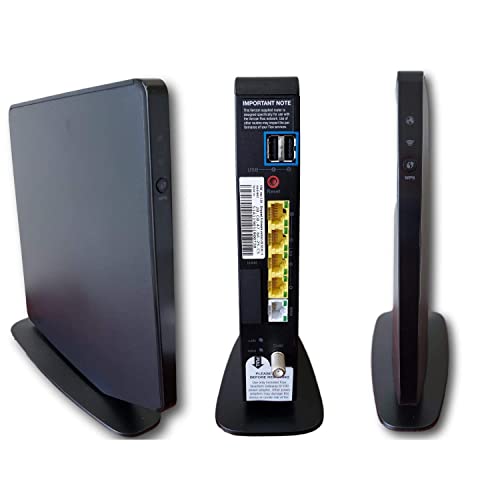
Verizon Fios charges $15 per month to rent its router. That adds up to $180 per year, which is a significant ongoing cost. You can buy the Fios router outright for around $300, or use a third-party router instead. Many Fios customers buy their own equipment to avoid the recurring fee.
Fios installation depends on whether your home already has fiber optic wiring in place. If a previous resident had Fios and the ONT (Optical Network Terminal) is still installed, setup can be straightforward. Online orders sometimes qualify for free installation.
If your home has never had Fios, a technician needs to install the ONT, which is the box that converts the fiber optic signal into an Ethernet connection your router can use. This installation can cost around $99 and typically takes 2 to 4 hours, depending on how complicated the wiring run is from the street to your home.
| Fee or Equipment | Spectrum | Verizon Fios |
|---|---|---|
| Modem/Gateway | Included free | ONT included (fiber terminal) |
| WiFi Router Rental | $5/month | $15/month |
| Use Your Own Router | Yes | Yes |
| Self-Install | Free (kit shipped to you) | Available if ONT already installed |
| Professional Install | ~$49.99 | Free to ~$99 (varies by order) |
| Contract Required | No | No |
| Early Termination Fee | None | None |
On monthly equipment costs, Spectrum has the edge. A free modem plus the option to use your own router means you can pay $0 per month for equipment. With Fios, avoiding the $15 monthly router fee requires a $300 upfront purchase or sourcing a compatible third-party router.
Is Spectrum or Fios Better for Working From Home
Remote work has made this comparison more relevant than ever. If you spend your days on video calls, uploading files to shared drives, and collaborating through cloud-based tools, the technical differences between cable and fiber become very practical.
Fios is the stronger choice for remote workers. The symmetric upload speeds mean your video calls stay crisp and stable. Large file uploads finish in minutes instead of hours. When two or three people in a household are all on video calls at the same time, Fios handles the combined upload demand without any strain.
Spectrum can handle remote work for a single user without major problems. The 300 Mbps download speed is more than enough for any cloud-based work. But that 10 Mbps upload starts showing its limits with multiple simultaneous video calls or frequent large file transfers.
Latency is another factor. Fiber connections typically deliver lower latency, the delay between sending and receiving data, than cable. For video calls, lower latency means less lag, fewer audio cutouts, and smoother screen sharing. The difference is usually 5 to 15 milliseconds, which doesn’t sound like much, but it adds up in the responsiveness of real-time communication.
If remote work is your primary reason for choosing an ISP, and both Spectrum and Fios are available, Fios is the better pick. The upload speeds alone justify the choice, and fiber’s reliability advantage gives you one less thing to worry about during an important meeting.
Spectrum vs Fios for Gaming and Streaming
For streaming video from Netflix, YouTube, Disney Plus, or HBO Max, both Spectrum and Fios perform well. Streaming is almost entirely a download activity, and both providers offer more than enough download speed at every tier. Even the base 300 Mbps plan from either provider can handle multiple 4K streams running at the same time.
Gaming is where things get more interesting. Online gaming doesn’t actually need much bandwidth. Most games use less than 5 Mbps in either direction. What matters for gaming is latency and consistency.
Fios generally delivers lower latency than Spectrum. Fiber connections skip the signal conversion steps that cable requires, and fiber’s immunity to electromagnetic interference means fewer random latency spikes. For competitive online gaming where milliseconds count, Fios has a measurable advantage.
Game downloads and updates are another consideration. Modern games regularly push updates that are 20 to 100 GB. At 300 Mbps, a 50 GB update takes about 22 minutes. Both providers handle this equally well on the download side.
But if you stream your gameplay to Twitch or YouTube, upload speed becomes a big deal. Streaming at 1080p 60fps to Twitch needs about 6 to 8 Mbps of consistent upload bandwidth. On Spectrum’s base plan with 10 Mbps upload, that leaves almost no room for anything else. On Fios with 300 Mbps upload, you could stream gameplay and still have more than enough upload bandwidth for the rest of the household.
Frequently Asked Questions
Is Verizon Fios faster than Spectrum?
Download speeds are roughly the same at every price tier. Both top out around 940 to 1,000 Mbps on their gigabit plans. The big difference is upload speed. Fios delivers symmetric speeds where your upload matches your download. Spectrum’s upload speeds max out at roughly 35 Mbps even on the gigabit plan. For anyone who needs strong upload performance, Fios is significantly faster where it counts.
Does Spectrum have data caps?
No. Spectrum doesn’t enforce data caps on any of its residential internet plans. You can use unlimited data every month without overage charges or throttling. Verizon Fios also has no data caps. Both providers offer truly unlimited data at every speed tier, which isn’t something every ISP can say.
Why are Spectrum upload speeds so slow compared to Fios?
It comes down to the underlying technology. Spectrum uses coaxial cable, which was originally designed for television, a one-way medium. The cable standard (DOCSIS) allocates most of the available bandwidth to downloads, leaving a narrow channel for uploads. Fiber optic lines, like those used by Fios, carry data as light and can deliver equal bandwidth in both directions without any trade-off. It’s a fundamental hardware limitation, not a choice Spectrum makes.
Can I use my own router with Spectrum or Fios?
Yes, both providers let you use your own router. With Spectrum, the free modem connects to the cable line, and you plug your own router into the modem. With Fios, the ONT provides an Ethernet port that connects directly to any compatible router. Using your own equipment saves $5 per month with Spectrum and $15 per month with Fios. Check each provider’s website for their list of approved or compatible routers before buying.
Is Fios available in my area?
Fios is available in approximately 10 states, all in the northeastern US. Coverage includes parts of New York, New Jersey, Pennsylvania, Connecticut, Massachusetts, Rhode Island, Maryland, Virginia, Delaware, and Washington DC. Availability varies at the street level, though. Even within Fios territory, not every address has fiber access. The only way to confirm is to enter your address at verizon.com. If Fios isn’t available, it likely won’t be anytime soon, since Verizon hasn’t significantly expanded its fiber footprint in recent years.
Does Spectrum require a contract?
Before choosing a provider, use our ISP coverage checker to see every option available at your zip code.
For Fios vs Cox, see our provider comparison.
Comparing carriers? Our Verizon vs AT&T comparison covers pricing, coverage, and value.
No. Spectrum doesn’t require contracts for any of its residential internet plans. You pay month to month and can cancel at any time without early termination fees. Verizon Fios also operates without contracts or cancellation penalties. This is one of the few areas where both providers offer identical terms.