How Wireless Security Cameras Work in 2026
Wireless security cameras have become a standard part of home security, and they are easier to install than ever. But “wireless” can mean different things depending on the camera, and understanding how these devices actually work will help you pick the right one and avoid common frustrations. Let’s walk through the core technology behind wireless security cameras.
What Does “Wireless” Actually Mean?
When a security camera is labeled “wireless,” it almost always means it connects to your home network over Wi-Fi instead of a physical ethernet cable. That is the “wireless” part. However, many wireless cameras still need a power cable plugged into an outlet. So “wireless” usually refers to the data connection, not the power source.
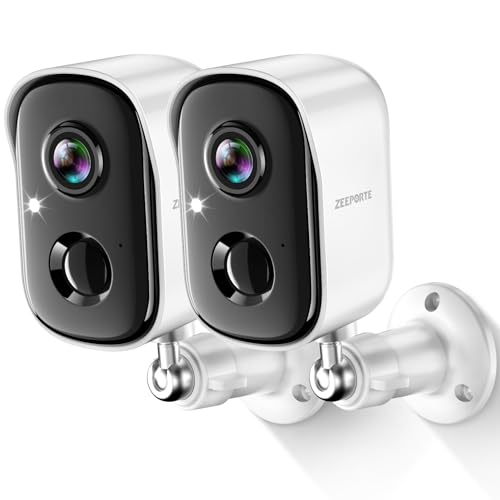
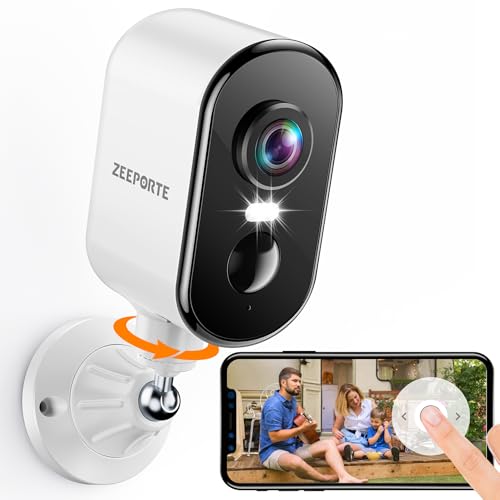
Truly wire-free cameras run on rechargeable batteries or solar panels, meaning no cables at all. These are popular for renters and locations where running a power cable is impractical, like a detached garage, a fence post, or a high-mounted exterior spot.
Wi-Fi Cameras vs Cellular Cameras
Most wireless cameras use your home Wi-Fi to send video to the cloud or to your phone. They need a stable connection with decent signal strength. If your Wi-Fi drops out, the camera goes offline (though some will still record to a local SD card).
Cellular cameras have a built-in SIM card or eSIM and connect to a mobile network (typically 4G LTE) instead of Wi-Fi. This makes them ideal for locations without internet, like construction sites, vacation cabins, farm buildings, or RVs. The downside is that cellular cameras require a data plan, usually $5 to $15 per month, on top of any cloud storage fees. Brands like Reolink and Arlo offer cameras with both cellular and Wi-Fi options.
How Video Is Stored
There are two main storage approaches, and many cameras support both.
Cloud storage means your camera uploads recorded clips to the manufacturer’s servers. You access them through a phone app or web portal. The advantage is that even if someone steals or destroys the camera, your footage is safe on the server. The disadvantage is that cloud storage usually costs a monthly fee ($3 to $10 per camera per month), and your clips travel over the internet, which raises privacy questions for some people.
Local storage typically means the camera saves video to a microSD card inserted into the camera itself, or to a network-attached storage (NAS) device or base station on your home network. There are no monthly fees, and your video stays on your own hardware. The risk is that if the camera or card is damaged, stolen, or corrupted, the footage is gone.
Some cameras offer both options, recording continuously to a local card while also uploading motion-triggered clips to the cloud. That gives you a good backup strategy.
Battery vs Wired Power
Battery-powered cameras are easy to install since you just mount them with screws or magnetic mounts and you are done. Battery life varies depending on how much motion the camera detects. In a busy area, a battery camera might last two to three months per charge. In a quieter spot, some models last six months or more. Most battery cameras do not record continuously. They wake up and start recording when they detect motion, which saves battery but means you might miss the first second or two of an event.
Wired-power cameras (plugged into an outlet or hardwired) never run out of battery, can record 24/7 continuously, and can afford to run features like higher resolution and always-on spotlights. The trade-off is that installation requires access to an outlet or running a cable.
Some cameras split the difference with solar panel accessories. A small panel connected to the camera keeps the battery topped up, so you rarely need to bring the camera inside to charge.
Motion Detection: How Cameras Decide When to Record
Almost all wireless cameras use one or more types of motion detection.
Pixel-based detection compares frames of video and looks for changes. It is simple and effective but can trigger on wind-blown trees, shifting shadows, or passing headlights.
PIR (passive infrared) sensors detect heat signatures. They are better at ignoring visual noise and focusing on people, animals, and vehicles. Most outdoor cameras use PIR sensors.
AI-based detection runs image recognition to identify whether the motion was caused by a person, a pet, a vehicle, or a package. This feature usually requires a cloud subscription (because the processing happens on the manufacturer’s servers), but it dramatically reduces false alerts. Some newer cameras run basic AI detection on the device itself, which is faster and does not require a subscription.
Night Vision
Wireless cameras use two types of night vision.
Infrared (IR) night vision lights up the area with invisible IR LEDs. The camera’s sensor picks up the reflected light and produces a black-and-white image. This works well and is standard on nearly every camera, but you lose color information.
Color night vision uses a bright spotlight or ambient light sensor to capture full-color footage in the dark. Color video is more useful for identifying people and vehicles. The trade-off is that the spotlight can be noticeable and may not be ideal for every location.
Two-Way Audio
Most modern wireless cameras include a built-in speaker and microphone, letting you talk to whoever is on camera through your phone app. This is useful for telling delivery drivers where to leave a package, warning off trespassers, or checking in with family members at the door. Audio quality varies widely between brands. If two-way talk is important to you, look for models with noise cancellation and echo reduction.
Encryption and Security
Since your camera is sending video over the internet, encryption matters. Look for cameras that use end-to-end encryption (E2EE), which means even the manufacturer cannot view your footage. At a minimum, the camera should use TLS encryption for data in transit and AES-128 or AES-256 encryption for stored footage.
Beyond encryption, keep your camera’s firmware updated. Manufacturers regularly patch security flaws. Use a strong, unique password for your camera account, and enable two-factor authentication if the app supports it.
Bandwidth and Wi-Fi Requirements
A single 1080p camera streaming continuously uses about 1 to 4 Mbps of upload bandwidth. A 2K or 4K camera can use 4 to 8 Mbps or more. If you have several cameras streaming at once, that upload traffic adds up and can slow down your other internet activity.
For most homes, having three to four cameras on a standard internet plan works fine as long as your upload speed is at least 10 Mbps. If your upload is slower, consider cameras that record to local storage and only upload short clips when motion triggers, rather than streaming continuously.
Place your router or a mesh node within reasonable range of each camera. Outdoor cameras often struggle with weak Wi-Fi because they are far from the router and separated by exterior walls. A dedicated outdoor access point or a mesh satellite placed near a window can solve signal issues.