Portrait Settings on Canon G7X Mark II
The Canon G7X Mark II portrait settings let you take advantage of the camera’s built-in portrait mode, which automatically blurs the background and keeps your subject sharp. If you’re looking to shoot better portraits with this popular compact camera, here’s how to set everything up.
How to Activate Portrait Mode
- The G7X Mark II has several shooting modes designed for different scenes. Each mode adjusts the camera’s settings automatically to match what you’re shooting.
- Pick the right mode for your scene, and the camera handles exposure, focus, and color tuning on its own.
[Portrait] mode ( ) is designed specifically for people shots. It softens the background and puts the focus right on your subject. Here’s how to turn it on:
- Switch to [SCN] mode.
Turn the mode dial to [SCN] and press the <Power> button.
Canon G7X Mark II Portrait Settings- Select Portrait Mode.
Press the [ ] button, scroll to [] in the menu, and select Portrait Mode.
Hint: You can also rotate the mode dial to [SCN], or just tap [] directly on the touchscreen to switch modes faster.
- When this icon [] shows up on the LCD, you’re good to go.
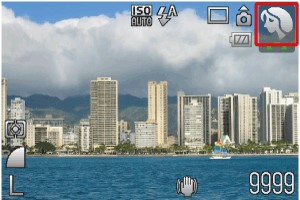
Portrait Mode is now active. You can shoot both stills and video with that signature soft background blur.
Canon G7X Mark II: Quick Overview
Pros
This camera is a great pick for travelers who want something small and pocketable. The Canon G7X Mark II is light enough to carry all day without fatigue.
It handles low-light situations really well for a compact camera, and the f/1.8 wide-end aperture gives you decent background blur and depth of field control that most point-and-shoots can’t match.
Cons
Sports and fast-action photography aren’t its strong suit. The autofocus and burst speed can’t quite keep up with quick-moving subjects.
Battery life is on the shorter side too. If you’re planning a full day of shooting, pack a spare battery or two.
Final Thoughts
- The Canon G7X Mark II builds on the original G7X with better ergonomics and the DIGIC 7 processor, which speeds up shooting and improves image quality. It’s a solid choice for photographers who prioritize portability.
- As a Canon flip screen camera, it gives you extra flexibility with its tiltable display and built-in flash for creative angle shots.