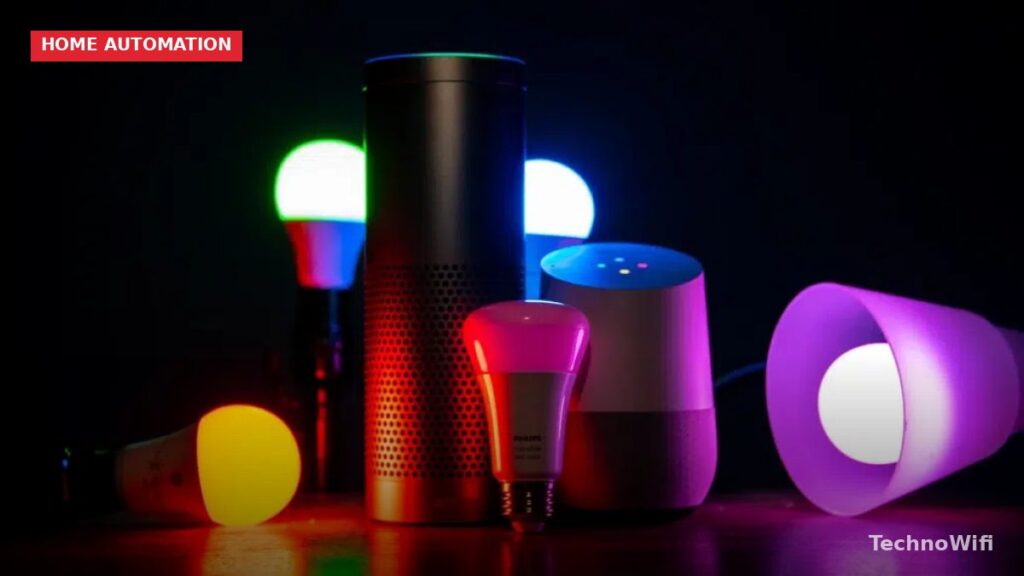
Smart lighting is any light fixture, bulb, switch, or plug that connects to your home network and can be controlled remotely through a phone app, voice assistant, or automated schedule. Instead of walking to a wall switch, you tell Alexa to dim the living room or set a timer that turns off the porch lights at midnight. Some smart lights also change color, respond to music, and sync with sunrise and sunset times based on your location.
The technology has matured quickly. Early smart bulbs were expensive, slow to respond, and locked into proprietary apps. In 2026, most smart lighting products work across platforms, respond almost instantly, and cost about the same as a nice LED bulb did five years ago. Whether you want a single smart bulb on your nightstand or a whole-house setup with dozens of fixtures, the entry point has never been lower.
How Does Smart Lighting Work
Every smart light needs two things: a wireless radio to receive commands and software to interpret those commands. The radio connects the light to your phone, voice assistant, or automation hub. The software handles actions like dimming, color changes, scheduling, and grouping lights into rooms or scenes.
There are three main ways smart lights connect to your network, and each one works differently.
Wi-Fi smart bulbs connect directly to your home router, just like your phone or laptop. No extra hub is required. You screw in the bulb, download the manufacturer’s app, and connect. Brands like Wyze, TP-Link Kasa, and LIFX use this approach. The upside is simplicity. The downside is that each bulb takes up a slot on your router, and Wi-Fi bulbs tend to use slightly more standby power than hub-based options.
Zigbee and Z-Wave smart bulbs use low-power mesh networking protocols and require a hub (like the Philips Hue Bridge or a SmartThings hub) to communicate. The hub plugs into your router and acts as a translator between the bulbs and your Wi-Fi network. Each bulb in a Zigbee or Z-Wave network acts as a signal repeater, so adding more lights actually strengthens the network rather than straining your router.
Bluetooth smart bulbs connect directly to your phone over Bluetooth. They work without Wi-Fi, but they have a limited range (usually 30 feet or less) and you can only control them when your phone is nearby. Some Bluetooth bulbs – like certain Philips Hue models – can also connect through a Zigbee hub, giving you both local Bluetooth control and remote access through the internet.
Smart Bulbs vs Smart Switches vs Smart Plugs
You don’t always need a smart bulb to get smart lighting. Depending on your setup, a smart switch or smart plug might be a better fit. Here is how the three options compare.
| Feature | Smart Bulb | Smart Switch | Smart Plug |
|---|---|---|---|
| What it replaces | The light bulb itself | The wall switch | Nothing – plugs into an outlet |
| Color changing | Yes (color models) | No | No |
| Dimming | Yes (most models) | Yes (dimmer models) | No |
| Works with any bulb | No – it is the bulb | Yes | Yes (lamps only) |
| Installation difficulty | Screw in like a normal bulb | Requires basic wiring (neutral wire often needed) | Plug and play |
| Best for | Individual lamps, color effects, bedrooms | Ceiling lights, multi-bulb fixtures, whole rooms | Table lamps, string lights, holiday lights |
| Price range (2026) | $8-$50 per bulb | $15-$45 per switch | $8-$25 per plug |
| Wall switch still works normally | Yes, but turning off the switch kills smart features | Yes – the switch becomes the smart device | Yes, if the outlet stays powered |
Smart bulbs are ideal when you want color, individual dimming control, or you’re renting and can’t modify wiring. The downside is that if someone flips the physical wall switch off, the smart bulb loses power and goes offline until the switch is turned back on.
Smart switches solve the wall switch problem because the switch itself is smart. Your existing bulbs stay in the fixture, and the switch controls power and dimming. This is the better choice for ceiling lights, chandeliers, and any fixture with multiple bulbs. However, smart switches require a neutral wire at the switch box, and many older homes don’t have one.
Smart plugs are the easiest starting point. Plug a table lamp into a smart plug, and now that lamp can be voice-controlled, scheduled, and automated. You don’t get dimming or color, but you get on/off control and scheduling for about $10.
What Protocols Do Smart Lights Use in 2026
The protocol your smart light uses determines how it connects, how fast it responds, and what other devices it works with. Here are the main ones.
| Protocol | Hub required | Range | Max devices | Standby power | Key brands |
|---|---|---|---|---|---|
| Wi-Fi | No (uses your router) | Same as your Wi-Fi | Limited by router capacity | Higher (1-2W per bulb) | Wyze, TP-Link Kasa, LIFX |
| Zigbee | Yes | 30-60 ft per node (mesh extends range) | 200+ per hub | Very low (0.1-0.5W) | Philips Hue, Sengled, IKEA Dirigera |
| Z-Wave | Yes | 30-100 ft per node (mesh extends range) | 232 per hub | Very low | GE/Jasco, Inovelli, Zooz |
| Bluetooth | No | 30 ft typical | Varies | Low | Some Philips Hue bulbs, Cync |
| Matter (over Thread) | Thread border router needed | Mesh network, extends with each device | Hundreds | Very low | Nanoleaf, Eve, Philips Hue (via update), TP-Link |
Matter is the protocol to watch in 2026. It was developed by Apple, Google, Amazon, and Samsung (among others) specifically to solve the compatibility problem. A Matter-certified smart bulb works with Apple Home, Google Home, Amazon Alexa, and SmartThings right out of the box, without needing the manufacturer’s app at all. Matter runs over Thread, a low-power mesh network similar to Zigbee, meaning it doesn’t clog your Wi-Fi and each device strengthens the overall mesh.
If you’re starting fresh in 2026, buying Matter-compatible lighting gives you the most flexibility. You won’t be locked into one ecosystem, and you can switch between Alexa, Google Home, or Apple Home down the road without replacing hardware.
How to Set Up Smart Lighting at Home
The exact steps depend on whether you’re using Wi-Fi bulbs, hub-based bulbs, smart switches, or smart plugs. This covers the most common setup: Wi-Fi smart bulbs controlled by a phone app.
- Pick your bulbs and download the app. Check which app your bulbs use before buying. TP-Link uses the Kasa app. Wyze uses the Wyze app. Philips Hue uses the Hue app (and requires a Hue Bridge hub). Download the app and create an account.
- Screw in the smart bulb and turn the power on at the wall switch. Most smart bulbs will blink or pulse to indicate they are in pairing mode. If the bulb doesn’t blink, turn it off and on three times in a row to reset it into pairing mode.
- Open the app and tap “Add Device.” The app will scan for nearby bulbs. Select your bulb from the list. The app will ask you to connect the bulb to your Wi-Fi network. Enter your Wi-Fi password when prompted. Only 2.4 GHz networks work with most smart bulbs – if your router broadcasts separate 2.4 GHz and 5 GHz networks, choose the 2.4 GHz one.
- Name the bulb and assign it to a room. Give it a clear name like “Bedroom Lamp” or “Kitchen Ceiling.” This matters for voice control – you’ll say “Alexa, turn off Bedroom Lamp,” so pick something short and easy to say.
- Connect to your voice assistant (optional). In the Alexa app or Google Home app, go to Settings and link your smart bulb account (Kasa, Wyze, Hue, etc.). Once linked, your voice assistant can discover and control the bulbs. You can group lights into rooms so a single command like “turn off the kitchen” controls multiple bulbs at once.
- Set up schedules and automations. In the bulb’s app, create schedules for when lights should turn on and off. Most apps also support sunrise/sunset triggers, so your porch light can turn on automatically at dusk and off at dawn without you updating the times seasonally.
Do Smart Lights Work with Alexa and Google Home
Nearly every smart light sold in 2026 works with both Amazon Alexa and Google Home. Apple Home (formerly HomeKit) support is less universal but growing, especially with Matter adoption. Here is a quick breakdown of voice assistant compatibility by brand.
Philips Hue works with Alexa, Google Home, and Apple Home. TP-Link Kasa works with Alexa and Google Home. Wyze works with Alexa and Google Home. LIFX works with Alexa, Google Home, and Apple Home. IKEA Dirigera works with Alexa, Google Home, and Apple Home. Any Matter-certified bulb works with all three platforms.
Voice commands go beyond “turn on” and “turn off.” You can say “dim the living room to 40 percent,” “set the bedroom to warm white,” or “turn the office light blue.” Most assistants also support routines – a single command like “good night” can turn off all the lights, lock the doors, and set the thermostat at the same time.
Can You Schedule Smart Lights to Turn On Automatically
Yes, and scheduling is one of the best reasons to own smart lighting. Every smart lighting app includes built-in scheduling. You set a time for lights to turn on, turn off, or change brightness, and the schedule runs automatically every day.
Beyond basic timers, most platforms support these automation triggers:
Sunrise and sunset – Your lights adjust based on actual sunrise and sunset times for your location. An outdoor light can turn on 30 minutes before sunset and turn off at sunrise, and the times shift automatically as the days get longer or shorter.
Motion sensors – Pair a smart motion sensor with your lights, and they turn on when someone enters a room and off after a set period of no motion. This works well for hallways, closets, garages, and bathrooms.
Geofencing – Your phone’s GPS triggers lights when you arrive home or leave. Walk up to your front door and the entryway light turns on. Leave for work and every light in the house turns off.
Scenes – A scene is a saved combination of light settings. You might create a “Movie Night” scene that dims the living room to 10 percent and sets the bias light behind the TV to a warm orange. Triggering a scene changes multiple lights at once to preset levels.
Color Smart Bulbs vs White Only Smart Bulbs
Smart bulbs come in two main types. White-only (sometimes called “tunable white”) bulbs can adjust brightness and color temperature from warm candlelight (2700K) to cool daylight (6500K). Color bulbs do everything a white bulb does, plus they can display millions of colors across the full RGB spectrum.
White-only bulbs cost less – typically $8-$15 per bulb compared to $15-$50 for color models. For most rooms in the house, white-only bulbs are all you need. Adjusting color temperature throughout the day (warm in the evening, cool during work hours) has a real effect on comfort and sleep patterns. Research from Harvard Medical School suggests that reducing blue light exposure in the evening helps maintain healthy sleep-wake cycles.
Color bulbs make sense in specific spots. A bias light behind your TV or monitor benefits from a soft color wash. Kids’ rooms, gaming setups, and entertainment spaces are natural fits. Some people use red or deep orange in the evening as a nightlight alternative because very warm tones have the least impact on melatonin production.
If you’re on a budget, put color bulbs where you’ll actually use color (one or two locations) and white-only bulbs everywhere else.
Do Smart Lights Save Electricity
Smart lights themselves are LED bulbs, which already use 75-80 percent less energy than incandescent bulbs and last 15-25 times longer, according to the U.S. Department of Energy. The “smart” part adds modest standby power draw (0.3-2 watts per bulb depending on protocol) but enables energy savings through automation that typically outweighs the standby cost.
The real savings come from behavior changes that smart controls make effortless. Lights turn off automatically when you leave a room or leave the house. Dimming a light to 50 percent reduces energy use by roughly 40 percent. Schedules prevent lights from running all night because someone forgot to flip the switch.
A household running 20 smart LED bulbs on automated schedules with motion-based controls will use noticeably less electricity than the same household with 20 traditional LEDs that get left on manually. The exact dollar savings depends on your electricity rate, but for most homes the energy cost difference between smart and non-smart LEDs is small in either direction. The bigger win is replacing any remaining incandescent or halogen bulbs with smart LEDs as part of the upgrade.
Is Smart Lighting Worth It in 2026
For most households, yes. Prices have dropped to the point where a single smart bulb costs under $10 and a starter kit with a hub and a few bulbs runs $50-$80. The technology has had years to stabilize, and Matter support means you’re no longer gambling on whether your brand will survive or stay compatible with your voice assistant.
Smart lighting pays off the most if you regularly forget to turn lights off, want voice control through a speaker you already own, have outdoor lights that need to follow sunset schedules, or simply want the convenience of controlling your house from the couch or from work. Families with kids often find that voice-controlled lights and bedtime schedules remove a nightly argument.
Where it makes less sense is in a home where you have one or two light fixtures, you’re happy with wall switches, and you don’t use a voice assistant. Smart lighting solves a real convenience problem, but if you don’t have that problem, a $10 LED bulb from the hardware store works fine.
Frequently Asked Questions
Do smart bulbs work if the Wi-Fi goes out?
It depends on the type. Wi-Fi smart bulbs lose all smart features during an outage, but they stay on or off in whatever state they were in when the network dropped. Zigbee and Z-Wave bulbs connected to a local hub can still respond to the hub’s commands, physical buttons, and some automations without internet. The wall switch always works regardless of Wi-Fi status – flipping it will turn the light on or off even with no network.
Do smart lights work with regular wall switches?
Yes, but with a catch. Smart bulbs need constant power to stay connected. If someone turns off the wall switch, the smart bulb loses power and goes offline. You can solve this by putting a switch guard over the toggle (a small plastic cover that prevents accidental flipping), using a smart switch instead of a smart bulb, or replacing the toggle switch with a smart dimmer that keeps power flowing to the bulb at all times.
How many smart bulbs can my router handle?
Most home routers can handle 20-30 Wi-Fi smart devices before performance starts to drop. If you plan to have more than that, consider a router designed for smart homes (look for models that support 100+ simultaneous connections) or switch to Zigbee or Z-Wave bulbs that connect through a hub and don’t use your Wi-Fi bandwidth at all.
Can I use smart lighting in a rental apartment?
Absolutely. Smart bulbs screw in like regular bulbs, so there’s nothing to modify. Smart plugs plug into standard outlets. When you move out, unscrew the smart bulbs, replace them with the originals (keep them in a drawer), and take your smart bulbs to your new place. Avoid smart switches in rentals unless your landlord approves the wiring change.
What is the difference between Matter and Zigbee?
Zigbee is a wireless protocol that has been around since the mid-2000s. It requires a hub and usually ties you to one ecosystem’s app. Matter is a newer standard (first devices shipped in 2023) that works across all major platforms – Apple Home, Google Home, Amazon Alexa – without needing a manufacturer-specific app. Matter runs over Thread, which is a mesh network similar to Zigbee but with built-in IP support. Many Zigbee hubs, including the Philips Hue Bridge, have been updated to also support Matter.
Sources:
- U.S. Department of Energy – Lighting Choices to Save You Money
- Connectivity Standards Alliance – Matter
- Harvard Health – Blue Light Has a Dark Side
- Energy Star – Learn About LED Bulbs
How we verify what we publishLast checked October 10, 2026Report an error