What Gaming Headset Should You Buy?
If you’re wondering “what gaming headset should I buy,” you’re in the right place. Gaming headsets are different from regular speakers in a few key ways:
- They deliver sound directly into your ears
- They include a microphone for in-game communication
Speakers can’t do either of those things well. When you want the best possible audio while gaming, a dedicated headset is the way to go.
On top of that, headsets are actually easier on your wallet compared to high-end speaker systems that can run $200 or more.
If you don’t want to disturb the rest of your household during late-night sessions and you want better sound quality, picking a gaming headset over speakers is the smarter choice.
How gaming headsets are different from normal headsets?
You might be wondering why you need a headset built specifically for gaming. It comes down to three things:
- Comfort
- Sound quality
- Microphone quality
During long, intense gaming sessions, you need a headset you can wear for hours without discomfort. A regular headset will technically work, but it won’t give you the same enjoyable experience that a purpose-built gaming headset can.
Why is it important to choose the right type of headset?
You don’t need a headset for every game. But for titles like Fortnite, Apex Legends, and PUBG, accurate directional audio cues can be the difference between winning and losing.
For games like Dota 2, Multiplayer Online Battle Area (MOBA) titles, and League of Legends, solid audio through a headset gives you a competitive edge.
Whatever your reason for shopping, investing in a good gaming headset will improve your overall experience.
How to choose the right gaming headset?
From shooters to racing games, sound plays a big role in performance. That’s why finding the right gaming headset matters. If you’re not sure where to start, here’s what to consider.
Determine your platform
Before you buy, ask yourself what platform you’ll be gaming on:
- Headset for Playstation
- Headset for PC
- Headset for Xbox
- Headset for Nintendo Switch
Your gaming platform can shape your decision more than you’d think.
Headsets with a 3.5mm connection work across all platforms. But keep in mind that these headsets won’t support every software-dependent feature your console offers, like virtual surround sound.
Sony makes its own gaming headsets, the PlayStation Wireless Gold and Platinum gaming headsets for PlayStation 4. Once connected to the console, they’re fully compatible with game-specific audio profiles and features like 7.1 virtual surround sound.
If you try using those same gaming headsets with the Xbox One, though, you’ll need an extra cable and a separate headset adapter. Always make sure the headset you buy fully supports your console of choice.
Wired vs wireless gaming headsets
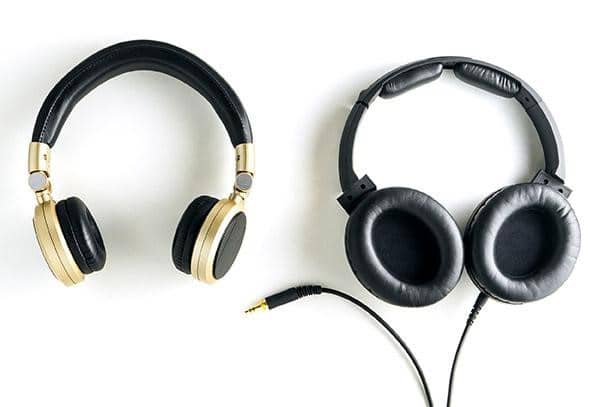
The next decision is whether to go wired or wireless. Both wired and wireless gaming headsets work well with the Nintendo Switch and other modern consoles.
Wired gaming headset
The best part about wired headsets? No charging required. You plug them in and start playing immediately.
Your wired headset relies on a physical connection, typically a 3.5mm jack for audio and mic input.
Pros:
- Plug in and you’re ready to go. No setup hassle.
- They’re lighter than wireless headsets since there’s no battery.
Cons:
- Cable length limits how far you can sit from your setup.
- Cables wear down and can break over time.
Wireless gaming headset
Wireless headsets give you freedom. You can move around, take them anywhere, and there’s no cable to manage. They’re typically sleeker and take up less space on your desk.
The big downside? They need to be charged before every session. Batteries also add weight to the headset. Most wireless gaming headsets need about an hour to charge and deliver 7 to 8 hours of battery life.
Open or closed headset
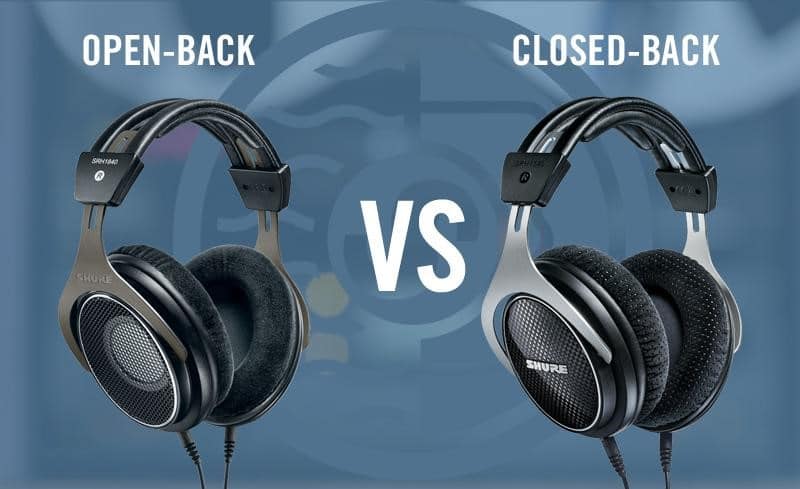
Poor noise isolation can cost you a match. This is especially true in games like Counter-Strike: Global Offensive and PUBG, where directional audio cues are critical for winning.
If you want to block out your surroundings completely, go with a closed gaming headset or one that has passive noise isolation. These headsets shut out external noise so you can focus entirely on the game.
With a closed headset, you’ll catch even the smallest in-game audio details, even in noisy environments. The tradeoff is that they can feel warm and clammy during long summer sessions.
If you’d rather stay aware of what’s happening around you, an open gaming headset is a better fit. Open headsets are more breathable and comfortable in warm weather.
Microphone
As a gamer, you need a built-in mic to communicate with your squad. Most gaming headsets come with a boom mic that’s either unidirectional or omnidirectional.
Omnidirectional mics pick up sound from all directions, which means your teammates might hear background noise and keyboard clatter.
Unidirectional mics, on the other hand, come with noise cancellation features. They reject off-axis sounds and produce crisp, clear voice chat. If clear communication matters to you, unidirectional is the way to go. Here’s a quick list of gaming headsets with microphones.
Comfort
You won’t fully appreciate comfort until you’ve worn a headset for a few hours straight. The goal is to find one you can wear for long sessions without fatigue.
Here’s what to look for:
Check the material used in the ear cups and headband.
- Leather ear cups look nice and feel premium but can get sweaty during extended play.
- The headband shouldn’t clamp too tightly. If it does, you’ll end up with a headache.
Look for something lightweight that doesn’t sacrifice comfort for features. Adjustable headbands are also a plus since they let you dial in the fit over time. Memory foam ear cushions tend to hold up better than standard padding across long gaming sessions.
We hope this guide helps you find the gaming headset you’ve been looking for. Remember, the best headset is the one that fits your specific needs and play style.
Got questions or need more help? Drop your thoughts and we’ll point you in the right direction!