When you purchase through links on our site, we may earn an affiliate commission. Here’s how it works.
Best Lenovo Laptop Docking Stations
A Lenovo laptop docking station (sometimes called a universal port replicator) is a hardware device that lets your portable computer connect to external peripherals quickly and cleanly.
Docking stations have become popular because they let you turn a laptop into a full desktop setup. You can keep a permanent workstation at your office or home and just drop your laptop into it when you arrive.
The main job of a docking station is connecting things. Laptops, phones, printers, tablets, monitors, keyboards, and mice can all hook up through a single dock.
Recommended List of Best Lenovo Laptop Docking Stations
| Docking station | USBs | Series | Weight |
|---|---|---|---|
| Lenovo USA thinkpad 135W | 2x HDMI; 2x DisplayPort; 1x Thunderbolt 3 Gen 2, 1x USB-C (Thunderbolt 3 compatible); 4x USB 3.1 Gen 2; 1x USB 3.1 Gen 2 with Always-on charging. | ThinkPad Thunderbolt 3 Dock Gen 2 135W (40AN0135US) | 2 pounds |
| Lenovo thinkpad Pro 135W | 1x USB-C (5 Gbps, 5V 3A power); 3x USB 3.0 Gen 1 (5 Gbps, 1 always-on USB Charging); 2x USB 2.0., 2x DisplayPort 1.4 ; 1x 3.5 mm Stereo/Mic Combo Port; 1x Gigabit Ethernet Port; 1x Kensington security lock slot (lock sold separately) | 135W Power Adapter (40AH0135US) | 1.69 pounds |
| Lenovo thinkpad USBC ultradock with 90W | 3x USB 3.0 ports, 2x USB 2.0 ports, 1x USB Type-C port, 2x Display Port, 1x Ethernet RJ45 port, 3.5mm Headset jack | Thinkpad USB C | 10.2 ounces |
| Lenovo thinkpad Workstation 230W | 6x USB 3.0, one supports always-on USB charging, 2x DisplayPort 1.2, 1x DVI-D, 1x HDMI 1.4, 1x VGA | 40A50230US | 2.16 pounds |
| Lenovo thinkpad VGA docking station | 3x USB 3.0 ports, 2x USB 2.0 ports, 1x USB Type-C port, 2x Display Port, 1x Ethernet RJ45 port, 3.5mm Headset jack | thinkpad VGA | 1.63 pounds |
| Lenovo thinkpad Mini Dock Plus | 2x DisplayPorts; 2x DVI-D ports; 1x VGA port, 6x USB 2.0 ports. Includes 1x ThinkPad 90W AC Power Adapter | Mini Dock Plus Series 3 Docking Station (433810U) | 2.1 pounds |
| Lenovo ThinkPad USB-C Dock Gen 2 | Ports: 3x USB 3.1, 2x USB 2.0, 1x combo audio jack, 1x gigabit Ethernet. Video ports: 1x HDMI, 2x DisplayPort. | USB-C Dock Gen 2 (40AS0090US) | 1 pound |
| Lenovo ThinkPad Thunderbolt 3 | Ports: 2x HDMI; 2x DisplayPort; 1x Thunderbolt 3 Gen 2. Ports: 1x USB-C (Thunderbolt 3 compatible); 4x USB 3.1 Gen 2; 1x USB 3.1 Gen 2 | Thunderbolt 3 Dock Gen 2 | 2 pounds |
| Lenovo ThinkPad Hybrid USB-C with USB-A | USB Ports: 3x USB 3.1 gen2 (10Gbps, 1x always-on USB charging); 2x USB2.0; 1x USB-C port (Data,5V 3A power). Ports: 1x Gigabit Ethernet; 2x Display Port; 2x HDMI Port; 1x Stereo/Mic Combo Audio Port. | Hybrid USB-C with USB-A Dock US (40AF0135US) | 1.05 pounds |
| Lenovo ThinkPad USB 3.0 | 5 , 3 x USB 3.0, 2 x USB 2.0, Dual display support through 1 x DVI and 1 x DP ports | USB 3.0 Pro Dock-USA (MFG P/N; 40A70045US) | 1.3 pounds |
| Lenovo OneLink Plus Dock | 4x USB 3.0, 2x USB 2.0, 1x VGA Port, 2x Display 1.2 ports, 10/1000 Gigabit Ethernet port | ThinkPad OneLink Plus Dock - 40A40090US | 2.2 pounds |
1. Lenovo USA ThinkPad 135W
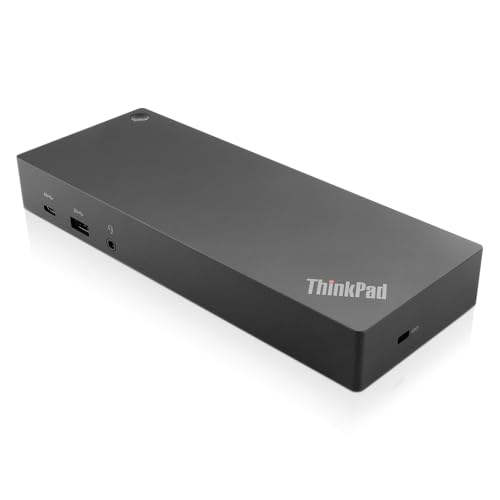
Lenovo Laptop Docking Stations – Lenovo USA ThinkPad 135W
Get ready for a productivity boost with the Thunderbolt 3 docking station, which brings serious versatility and speed to your desk. The chipset-powered dock works with both Thunderbolt-enabled laptops and USB-C ports, so compatibility isn’t an issue.
You can drive multiple 4K displays and transfer files at lightning speed. The dual display output delivers vivid visuals that work great for professional video editing and presentations.
2. Lenovo ThinkPad Pro 135W
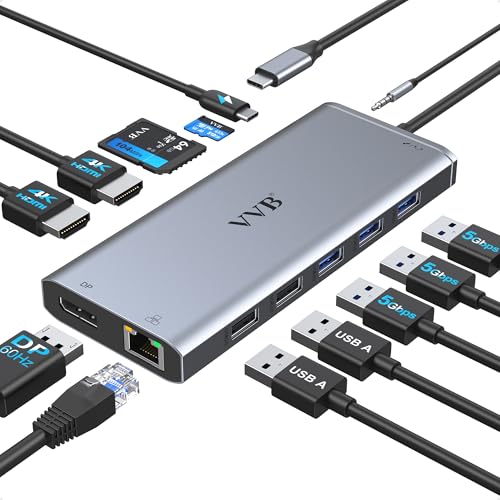
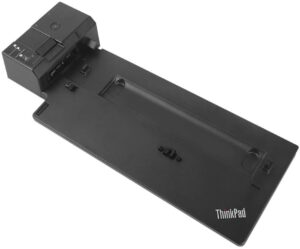
Lenovo Laptop Docking Stations – Lenovo ThinkPad Pro 135W
This dock is built to handle plenty of connections at once while keeping the docking experience smooth and reliable. It’s a strong fit for large enterprise ThinkPad deployments, using a side connector for simple plug-in connectivity.
The asset management features make IT administration easier. If you need a universal mechanical side-docking station, this one’s worth a look. It can also charge mobile devices through its 15W and 10.5W ports.
3. Lenovo ThinkPad USB-C Ultra Dock with 90W
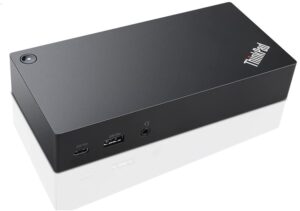
Lenovo Laptop Docking Stations – Lenovo ThinkPad USB C Ultra Dock with 90W
For flexible, enterprise-level multi-device connectivity, this docking station is a solid option. It handles high-speed data, video, and power delivery to your compatible notebook through an industry-standard connection.
You can connect USB peripherals and charge mobile devices at the same time. It also works as the centerpiece of a workstation, with full ThinkPad system control including system wake-on, PXE boot, and Hibernate mode.
4. Lenovo ThinkPad Workstation 230W
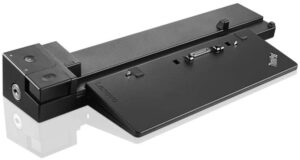
Lenovo Laptop Docking Stations – Lenovo ThinkPad Workstation 230W
This ThinkPad workstation dock ships with two 30W AC adaptors and gives you expanded work capability with multiple connectivity options. Video output depends on your system’s actual video performance, so what you see is what your laptop can push.
The dock pairs well with the ThinkPad P series, including the P50 and P70. Just keep in mind that it isn’t compatible with some of the newer ThinkPad models.
5. Lenovo ThinkPad VGA Docking Station
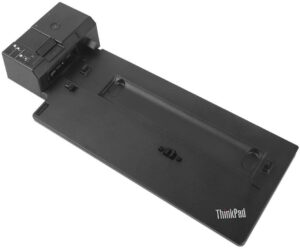
Lenovo Laptop Docking Stations – Lenovo ThinkPad VGA docking station
The ThinkPad primary docking station offers practical side-connector options designed for notebook users. If you need a driver-free connection with solid security and plenty of USB ports, this model checks those boxes.
It can also connect to external displays. The charging support and mirrored power button make docking and undocking quick and painless. This dock works well in large enterprise environments.
The basic configuration supports WAN/LAN, MAC address pass-through, PXE boot, and other management modes. It’s a well-tested ThinkPad basic dock that delivers a smooth docking experience with good convenience and productivity.
6. Lenovo ThinkPad Mini Dock Plus
The Mini Dock Plus supports internet, multiple USB devices, video equipment, audio equipment, and key lock security. It’s a convenient setup with both integrated and discrete graphics support.
Cable locks and key locks operate separately for added flexibility. The dock handles multiple connected devices at once, and overall performance is smooth and reliable.
7. Lenovo ThinkPad USB-C Dock Gen 2
The USB-C Dock Gen 2 from Lenovo is a next-generation universal docking station that won’t hold you back on connectivity. You can charge your notebook, connect legacy USB peripherals, and keep your mobile devices powered up, all at the same time.
USB data transfers hit speeds up to 10 Gbps, and wired network connections stay stable and hassle-free. When you’re multitasking, the dock supports vivid 4K streaming. It’s also compatible with DisplayPort 1.4 and HDMI 2.0 for flexible display options.
8. Lenovo ThinkPad Thunderbolt 3
The Thunderbolt 3 dock is a powerful and fast docking station built to maximize your productivity. Thunderbolt technology extends compatibility to both Thunderbolt and USB-C enabled laptops, giving you broad device support.
You can run multiple 4K displays and transfer files at top speed. If you need both creative capability and daily efficiency from one dock, this model delivers. It comes with USB-C and USB 3.1 ports.
9. Lenovo ThinkPad Hybrid USB-C with USB-A
This dock expands any Lenovo laptop’s capabilities and is well-suited for shared desk environments. You get enterprise-class manageability along with MAC address pass-through.
Because it’s a hybrid with both USB-C and USB-A, it offers high-speed connections across different port types. The included USB-A and USB-C adapters let it replicate ports on a wide range of Lenovo computers.
Dual monitor support powers UHD 4K resolution, and the ability to charge mobile devices makes it a versatile addition to any workspace.
10. Lenovo ThinkPad USB 3.0
This pro docking station brings professional-grade USB 3.0 connectivity with fast ports and digital video output. Connecting to your workspace peripherals is quick and simple.
Plug a single USB 3.0 cable into your Lenovo PC and you get instant access to two external monitors at once. You can also hook up gigabit Ethernet, printers, headphones, speakers, scanners, keyboards, and mice.
11. Lenovo ThinkPad OneLink Plus Dock
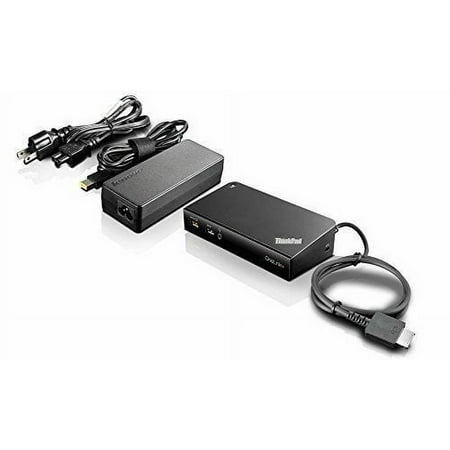
The OneLink Plus Dock uses a single cable for peripheral connection, continuous power delivery, and fast data transfer to devices with USB 3.0 speeds and ultra-high-definition video.
Available ports include USB 3.0, USB 2.0, VGA display output, and gigabit Ethernet with 4K video capability. The dock’s power button mirrors the system power button, keeping the docking experience simple and intuitive.
Wrapping Up
With 11 Lenovo laptop docking stations to choose from, you’re very likely to find one that fits your setup. No more struggling with a small screen or juggling multiple cable connections. Just pick the dock that matches your port needs and get your full desktop experience going.
